Every week, salon owners lose real bookings — not because their services aren’t great, but simply because they have no website, or they have one that has no booking system. A client searches for a salon near them, clicks on a result, and books instantly. If you’re not there, they book someone else.
I’m Nreepen KM Dony, a WordPress developer from Dhaka, Bangladesh with 10+ years of experience and 300+ websites built — most of them for spas, salons, massage studios, and barber shops. I know exactly what works and what doesn’t for this niche.
By the end of this post, you’ll know how to create a salon website with online booking — from scratch, with no coding required. You can have this done in 1–2 days even if you’ve never built a website before.
Let’s get started with what you’ll need before we dive into the steps.
Disclosure: This post recommends tools and services based on personal use and experience. If I join an affiliate program for any of these in the future, I’ll clearly mark those links as affiliate links.
What You'll Need to Get Started
Before building, gather these five things:
- A domain name — your website address (e.g., glamoursalon.com)
- A hosting account — where your website lives online
- Your logo — even a simple image file works to start
- Business photos — your salon interior, staff, or service results
- Your services list with prices — you’ll need this to set up your booking system
Don’t worry if you don’t have everything ready — I’ll show you where to get each one as we go through each step.
Step 1: Get a Domain Name and Hosting
This is the foundation of your entire website, so it’s worth doing right.
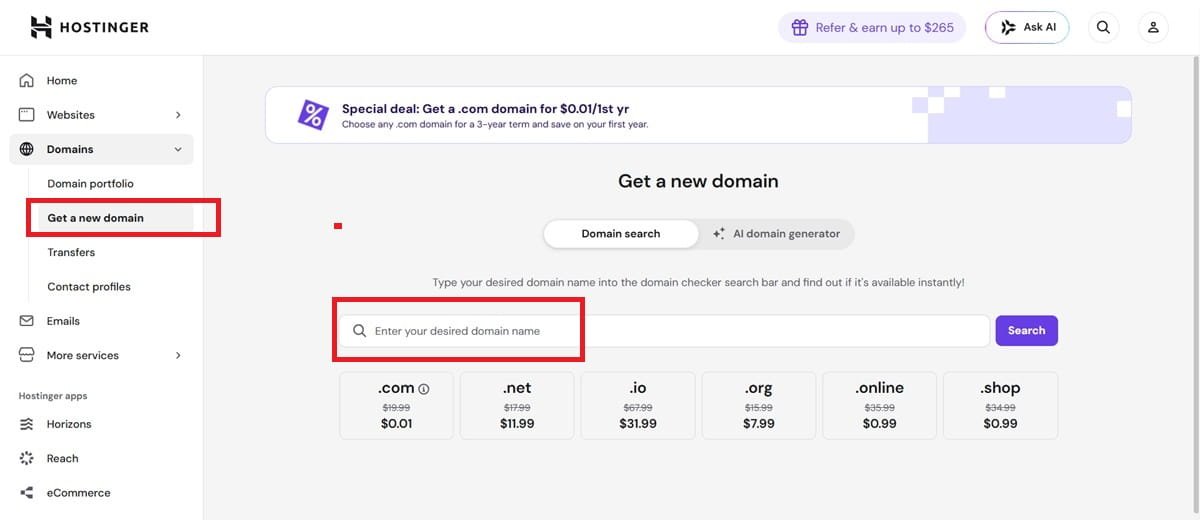
Your domain name is your address on the internet (like yoursalon.com). Hosting is the server where your website actually lives. You need both.
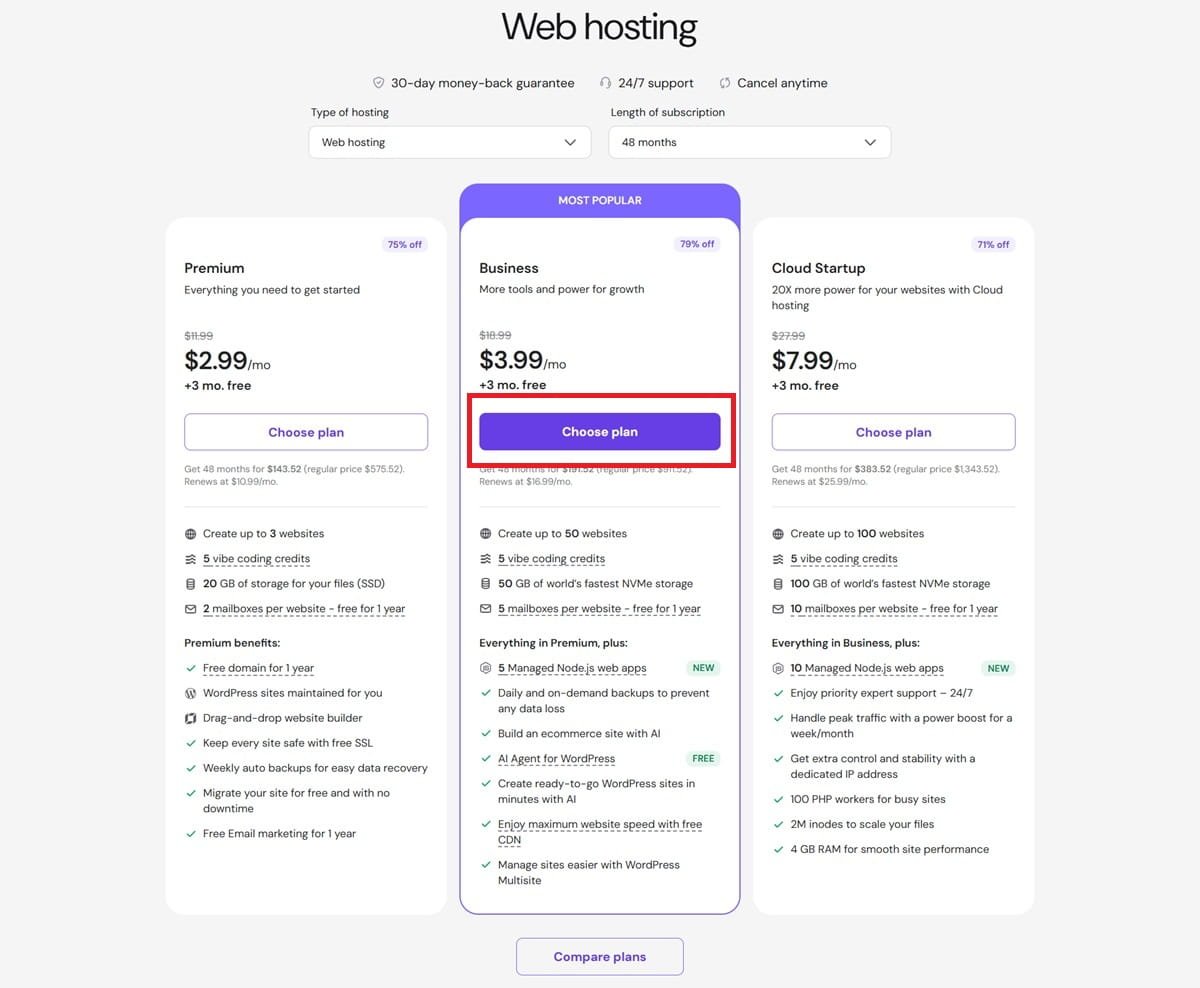
From my experience building 300+ sites, I always recommend Hostinger for salon and spa businesses. It’s affordable, reliable, and includes a free domain name with most plans — so you’re getting two things for the price of one. The setup is also beginner-friendly with a clean control panel.
Here’s what I recommend from my experience: go with at least the Premium Shared Hosting plan. The cheapest plan limits you to one website, which is fine — but the Premium plan gives you better speed and room to grow.
Steps:
- Go to Hostinger
- Choose the Premium or Business hosting plan
- Register your domain name during checkout (pick something short, easy to spell, and related to your business name)
- Complete payment and log into your Hostinger dashboard
Once this is done, you’re ready for Step 2.
Best Web Hosting for Salon Websites in 2026 (Honest Comparison)
Step 2: Install WordPress
WordPress is the platform your website will run on. It powers over 43% of all websites in the world, and it’s the best choice for a beauty salon website — flexible, beginner-friendly, and with thousands of salon-specific themes and plugins available.
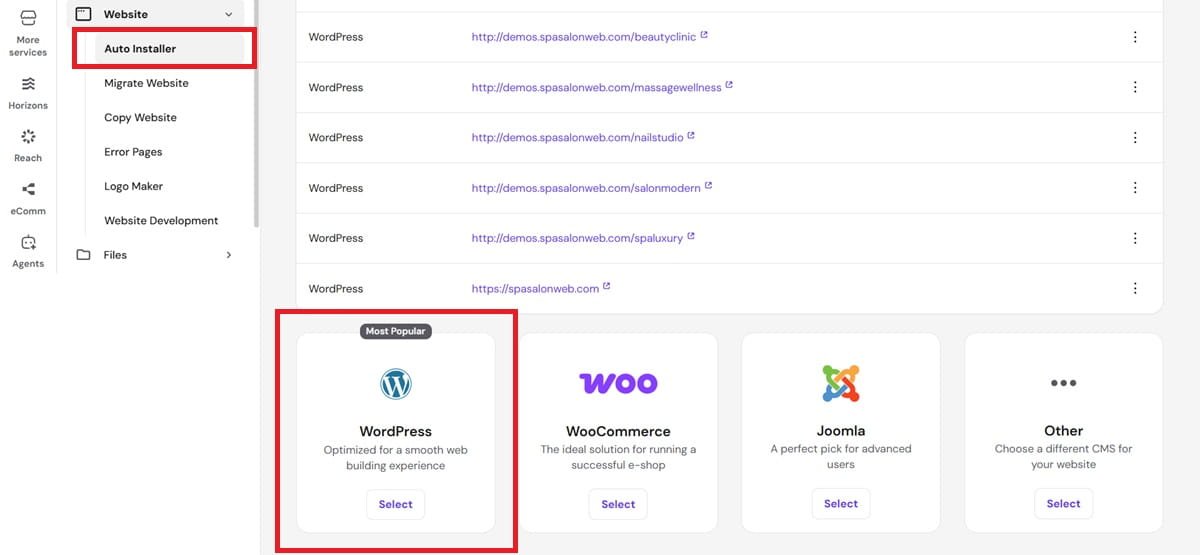
From your Hostinger dashboard, WordPress installation takes under 2 minutes:
- Log into your Hostinger hPanel
- Go to Websites → Add Website
- Select WordPress as your platform
- Set a username and password for your WordPress admin
- Click Install
Once installation completes, Hostinger will give you a link to your WordPress dashboard. Bookmark it — you’ll use it constantly.
Once this is done, you’re ready for Step 3.
Step 3: Choose and Install a Salon Theme
A theme controls how your website looks. The right salon theme WordPress uses will make your site look professional in minutes — no design skills needed.
Here’s what I recommend from my experience: Astra or Kadence are the two best free themes for salon websites. Both are fast, mobile-friendly, and compatible with all major booking plugins. Avoid heavy themes like Divi or Avada for salons — they’re slow on mobile and overkill for a service business site.
To install a theme:
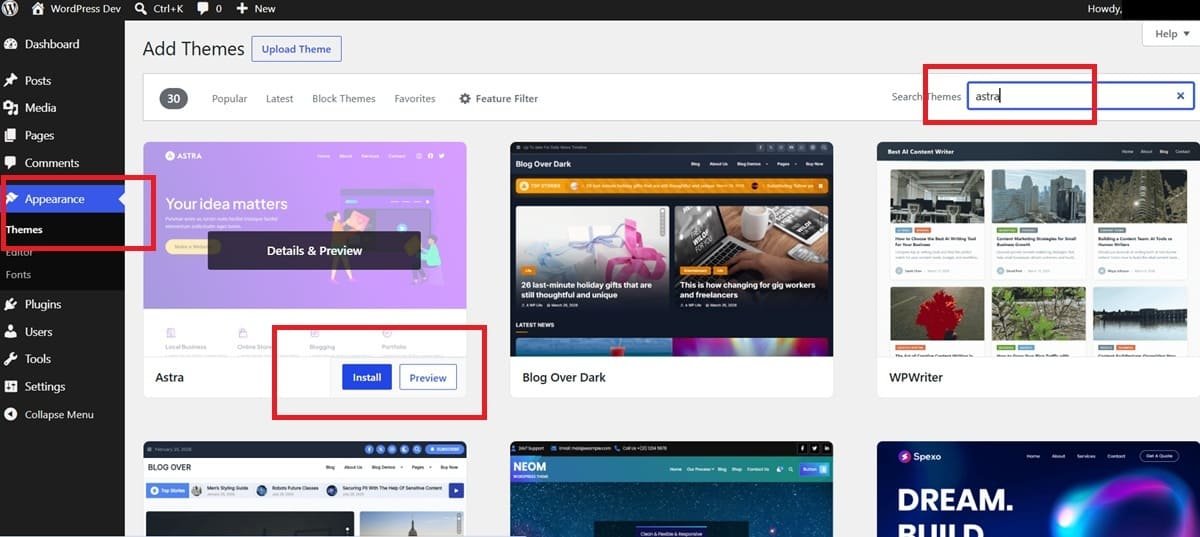
- In your WordPress dashboard, go to Appearance → Themes → Add New
- Search for “Astra” or “Kadence”
- Click Install, then Activate
- Import a starter template if available — both themes offer free salon/beauty starter templates that give you a professional layout instantly
Important: After activating, go to Appearance → Customize to upload your logo, set your brand colors, and change your business name.
Once this is done, you’re ready for Step 4.
Step 4: Set Up Your Key Pages
Every salon website needs four core pages. Without these, clients won’t trust your site enough to book.
Here’s what I recommend from my experience: keep the content short and clear. Salon clients scan — they don’t read long paragraphs. Use photos and bullet points wherever possible.
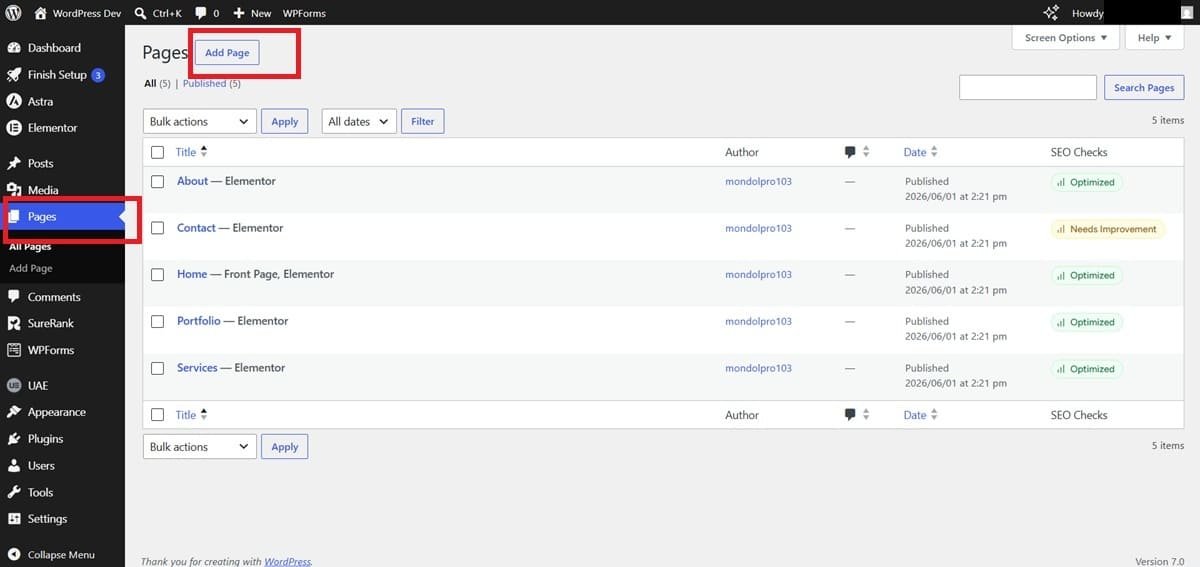
Create these pages in WordPress → Pages → Add New:
- Home Page — Your headline, a short description of your salon, a call-to-action button (“Book Now”), and 2–3 key photos. This is the first thing visitors see.
- Services Page — List every service with a short description and price. Group them by category (Haircuts, Coloring, Treatments, etc.)
- About Page — A short, human paragraph about your salon, your team, and what makes you different. Add a photo of your space or staff.
- Contact Page — Your address, phone number, business hours, and a simple contact form. Add a Google Map embed if you can.
Pro tip: Add a “Book Now” button in your main navigation menu pointing to your booking page (which you’ll set up in Step 5). This makes it easy for clients to book from any page.
Once this is done, you’re ready for Step 5.
Step 5: Install and Configure a Booking Plugin
This is the step that turns your website into a booking machine — and it’s the most important one.
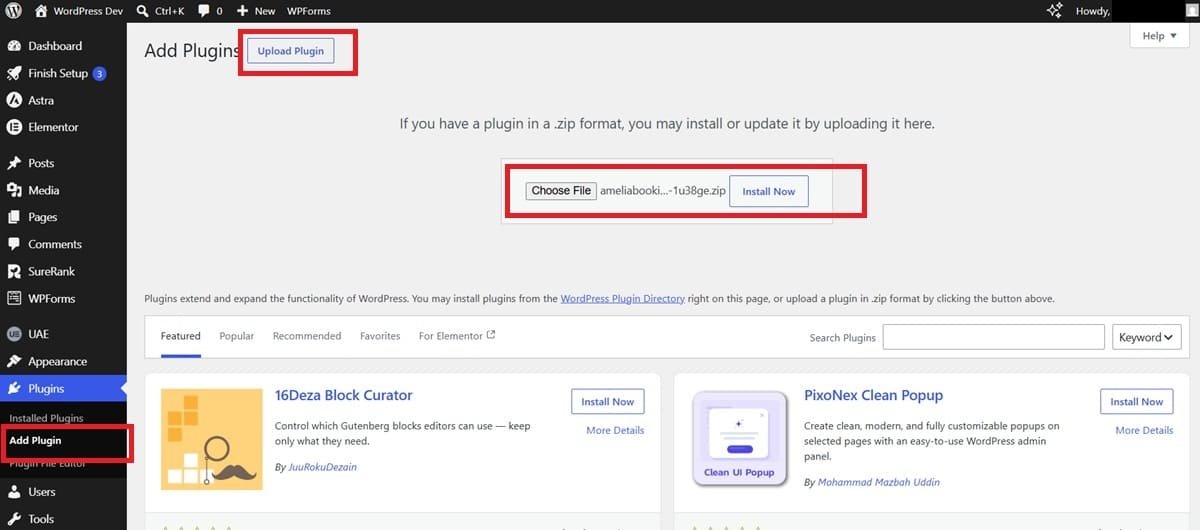
The best online booking plugin for salons is Amelia. I’ve used it on dozens of salon and spa projects and it’s the most complete solution available. It handles appointment scheduling, staff management, email confirmations, and payment collection — all in one plugin.
There’s also a free version called Simply Schedule Appointments if you’re on a tight budget, but for a client-facing salon business, Amelia is worth the investment.
To install:
- Go to Plugins → Add New in WordPress
- Search for “Amelia”
- Install and activate the free version, or purchase the pro version from wpamelia.com
Basic configuration after activation:
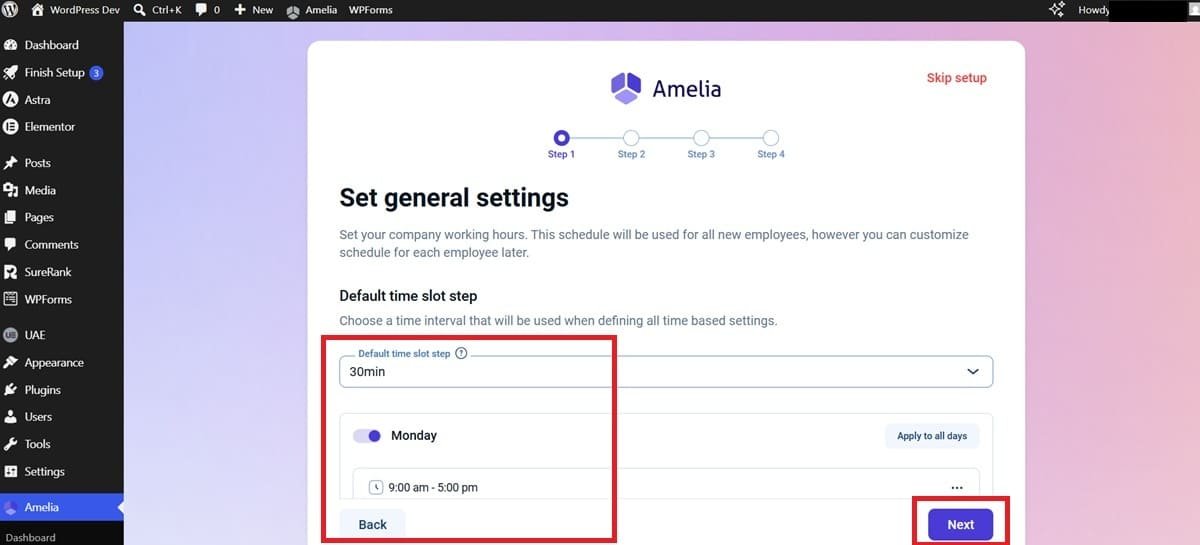
- Go to Amelia → Settings and enter your business hours
- Set your timezone correctly
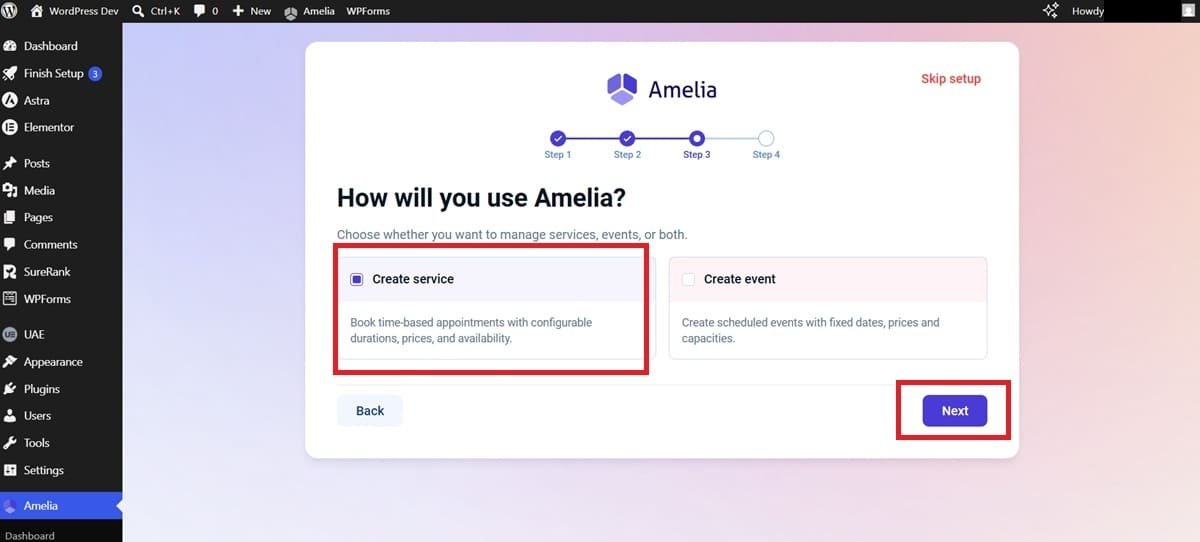
- Add your services (you’ll detail these in Step 6)
- Configure email notifications so clients get a confirmation after booking
Once this is done, you’re ready for Step 6.
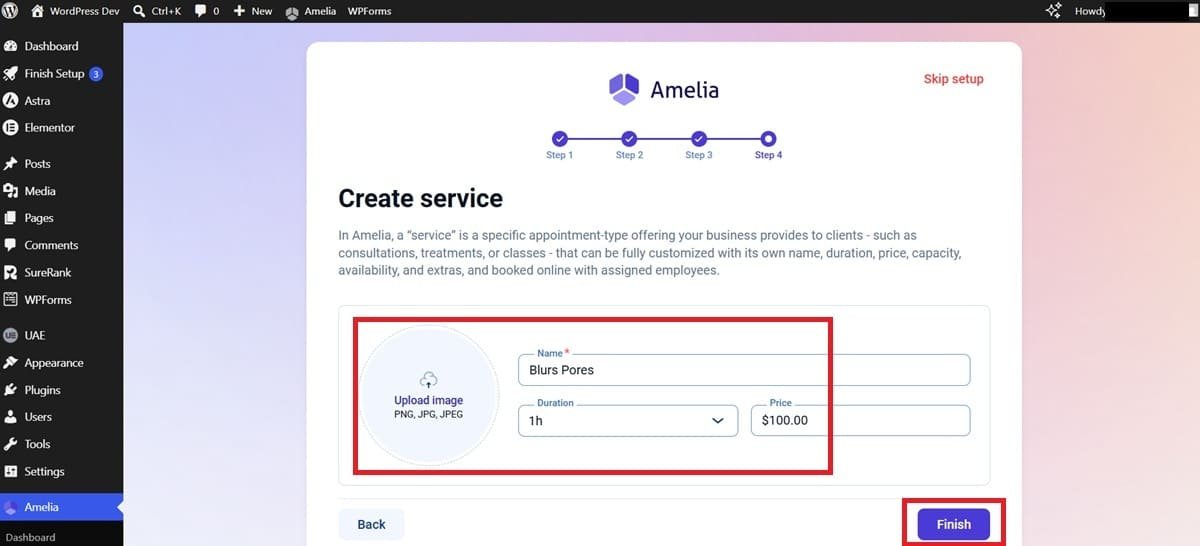
Step 6: Add Your Services, Prices, and Availability
Now you’ll fill in your actual salon services so clients can book the right thing at the right time.
Inside Amelia (or whichever booking plugin you chose), you’ll add each service individually. Here’s the format I use for every salon client:
- Service name (e.g., “Classic Haircut”)
- Duration (e.g., 45 minutes)
- Price (e.g., $45)
- Description (optional but helpful — 1–2 sentences)
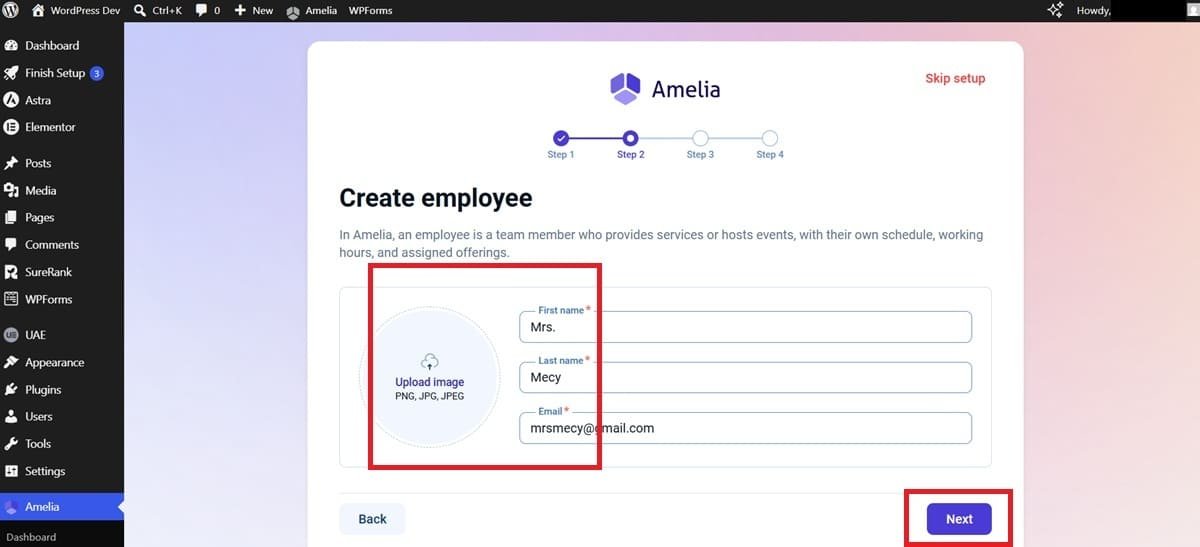
- Staff member assigned to that service
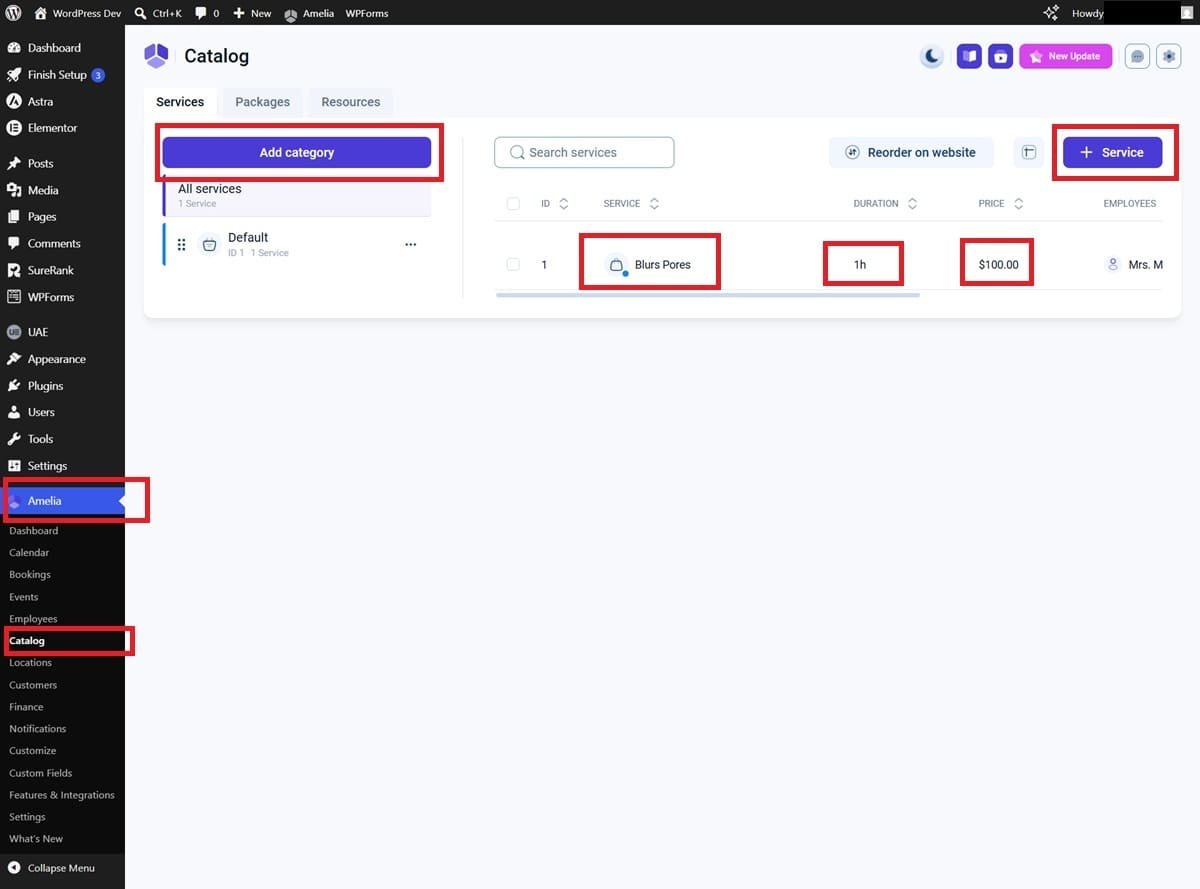
After adding services, go to your Staff section and set each team member’s working hours and days off. This prevents clients from booking during times when no one is available — a common issue I see on DIY salon websites.
Here’s what I recommend from my experience: Create service categories (Hair, Nails, Skin, etc.) inside Amelia. It makes your booking form cleaner and helps clients find the right service faster.
Once this is done, you’re ready for Step 7.
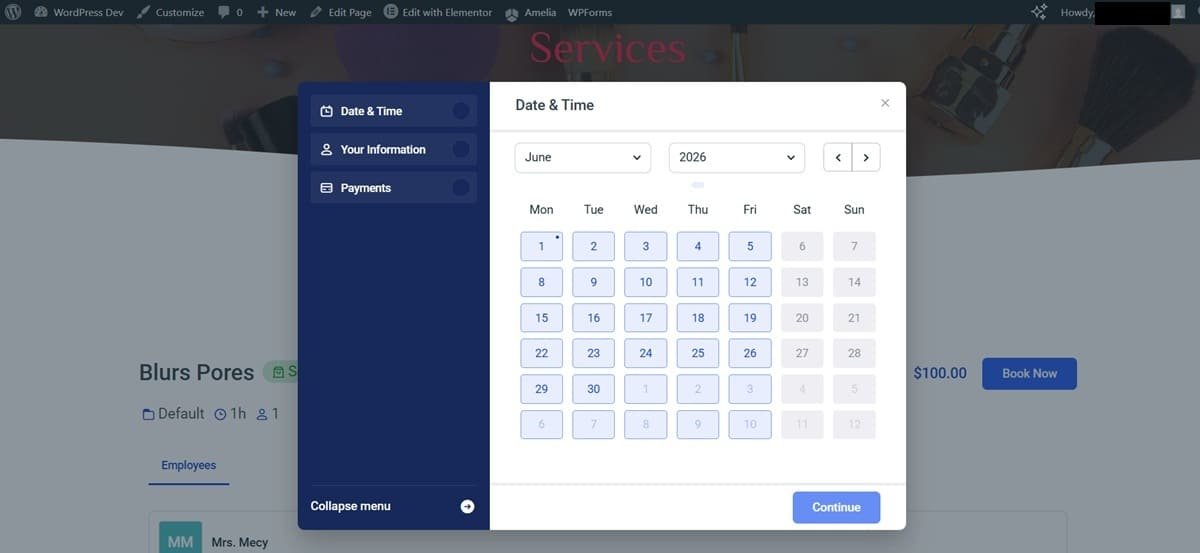
Step 7: Test Your Booking System and Go Live
Before you share your website with anyone, test everything as if you were a real client.
Testing checklist:
- Open your website on your phone (not just desktop)
- Go through the full booking flow: choose a service → pick a date → enter your name and email → confirm
- Check that you receive a confirmation email
- Make sure the appointment appears in your Amelia dashboard
- Click every navigation link to confirm nothing is broken
- Check that your contact form works
One step many salon owners skip: test on a slow mobile connection (not just WiFi). Most of your clients will be on their phones. If your site loads slowly, they’ll leave.
Once everything looks good, your site is ready. Share it on your Instagram bio, Google Business Profile, Facebook page, and anywhere else clients look you up.
Congratulations — your salon website with online booking is live.
Tools I Used in This Tutorial
Tool | What It Does | Free or Paid |
|---|---|---|
Hostinger | Web hosting + domain registration | Paid (affordable) |
WordPress | Website platform (CMS) | |
Astra / Kadence | Salon-ready WordPress themes | |
Amelia | Appointment booking plugin | |
Simply Schedule Appointments | Lightweight booking alternative | |
Google Maps Embed | Show your salon location | |
My top recommendation is Amelia for the booking plugin — especially the Pro version. It’s the only plugin I’ve used that handles staff scheduling, service categories, and payment collection cleanly without needing extra plugins on top.
Mistakes I See Salon Owners Make (From 300+ Projects)
Choosing a slow theme that kills mobile loading speed. I see this constantly. Salon owners pick a “beautiful” theme that’s packed with animations and heavy sliders — and it loads in 8 seconds on mobile. Clients leave after 3. Stick with Astra or Kadence and keep your page simple.
Not connecting a payment method to the booking system. If clients can book without paying a deposit, you’ll get no-shows. Amelia Pro supports Stripe and PayPal — use it. Even a small $10 deposit dramatically reduces no-shows from real experience.
Using free hosting for a client-facing business. Free hosting is fine for learning. For a real salon website that clients are supposed to trust with their credit card and personal info, it’s not acceptable. Slow speeds, downtime, and no SSL certificate will cost you bookings.
Skipping the mobile test before going live. Your website might look perfect on a laptop and completely broken on a phone. Always test on at least two different phones before you publish.
Read my top salon website mistakes with 10-checklists (And How to Fix Them Fast).
Pro Tips to Make Your Salon Website Stand Out
Add real before-and-after photos to your Services page. For salons, transformation photos are more powerful than any copy you could write. Even 3–4 quality photos from your phone can dramatically increase bookings.
Set up a Google Business Profile and link it to your website. It’s free, and it makes your salon show up in local Google searches and Google Maps. Make sure your website URL is listed in your profile.
Use Amelia’s coupon feature to run promotions. Amelia Pro lets you create discount codes for seasonal promos (e.g., 15% off in January). Promote these on Instagram and link straight to your booking page — it’s a simple way to drive bookings during slow periods.
Add a WhatsApp chat button to your website. Many salon clients prefer messaging over filling out a form. A floating WhatsApp button (you can add one with a free plugin like “Click to Chat”) gives clients an instant way to reach you.
Ready to Build Your Spa & Salon Website?
You now have a complete roadmap: from getting your domain and hosting, to installing WordPress and a booking system, to testing everything before going live. The whole process takes 1–2 days — and you don’t need to know a single line of code.
The key is to just start. A simple website with a working booking system beats a perfect website that never gets built.
If you get stuck at any step, feel free to reach out — or you can hire me on Fiverr to handle the entire setup for you. I’ve built 300+ salon and spa websites and I can have yours ready in 3–5 days.
Frequently Asked Questions — How to Create a Salon Website with Online Booking?
Q1: How much does it cost to build a salon website?
A: A basic salon website with online booking costs around $50–$100/year for hosting and domain, plus $79–$199 one-time for the Amelia Pro booking plugin. If you build it yourself using this guide, that’s all you need. Hiring a developer like me on Fiverr typically runs $150–$500 depending on the scope.
Q2: How long does it take to build a salon website?
A: If you follow this guide from start to finish, plan for 1–2 days at a relaxed pace. Most of the time is spent adding your services, photos, and content — not technical setup. The WordPress and plugin installation steps take less than 30 minutes combined.
Q3: Do I need to know coding to do this?
A: Not at all. This entire guide uses tools that work through visual dashboards — no coding required anywhere. WordPress, Hostinger, and Amelia are all designed for non-technical users. If you can use Facebook, you can build this website.
Q4: Which booking plugin is best for a salon?
A: Amelia is the best WordPress salon booking plugin for most salon and spa businesses. It handles appointment scheduling, staff management, email reminders, and payment collection in one place. The free version is a good starting point, but the Pro version is worth the investment if you’re serious about reducing no-shows and automating your bookings.
Q5: Can I add online payments to my booking system?
A: Yes — Amelia Pro integrates with Stripe and PayPal, so clients can pay a full amount or deposit at the time of booking. This is one of the most important features for reducing no-shows, and I recommend enabling it from day one.