Picture this: a potential client is searching Google for a spa near her. She finds your website, clicks the link, and waits. Three seconds. Four. Five. Six. Nothing but a blank screen and a spinning loader. She hits the back button and books with the spa that loaded in under two seconds.
That scenario plays out hundreds of times a day across spa websites that look great — but perform poorly. No one told the spa owner why every spa needs a fast website. No one warned them during the design process. And by the time they notice, they have already lost real bookings to faster competitors.
My name is Nreepen KM Dony. I am a WordPress developer with over 10 years of experience, and I have built more than 300 websites specifically for spas, salons, massage studios, and barber shops — primarily through Fiverr, where I maintain a 4.9-star rating. Speed optimization is one of the most common fixes I am hired to do, and this post explains exactly why it matters for your business.
Here is what I will cover: why website speed is directly tied to how many bookings your spa gets, what slow load times are costing you right now, and what you can do to fix it — without needing to be technical.
Disclosure: This post recommends tools and services based on personal use and experience. If I join an affiliate program for any of these in the future, I’ll clearly mark those links as affiliate links.
What a Slow Website Is Actually Costing Your Spa
The numbers on this are blunt. 53% of mobile users abandon a site that takes longer than 3 seconds to load. That is more than half your potential clients leaving before they even see your services. And a 1-second delay in load time can reduce conversions — in your case, bookings — by up to 7%. On top of that, Google uses page speed as a direct ranking factor, which means slow sites rank lower in search results and get less traffic to begin with.
For a spa business, these are not abstract statistics. Your booking page, your service menu, your photo gallery — these are the pages clients need to see before they decide to call or book. If any of those pages loads slowly, you lose them.
In my 8 years of building spa and salon websites, the number one technical complaint I hear from clients who come to me after a bad experience elsewhere is: “my website is too slow and I don’t know why.”
Speed is not a cosmetic issue. It is a revenue issue. And the good news is that once you understand what causes the problem, fixing it is more straightforward than most spa owners expect.
Why Website Speed Matters Even More for Spa & Salon Businesses
Speed matters for every website — but for spas and salons specifically, the stakes are higher than average. Here is why.
Most spa clients browse on mobile. Over 70% of local business searches happen on mobile devices. Mobile networks — even fast 4G connections — are significantly slower than home WiFi. Your website has to load quickly under those conditions. A site that performs fine on a laptop can feel painfully slow on a phone. For a luxury wellness brand, that experience communicates unprofessionalism before the client has seen a single photo.
First impressions decide bookings. A spa sells relaxation, trust, and the promise of a high-quality experience. If your website feels slow and frustrating to use, the client forms a judgment about your business before they ever step through your door. Speed is part of your brand image whether you think about it or not. A slow website and a premium spa experience are not a natural pairing — and clients feel that disconnect.
Slow sites rank lower on Google. Since 2021, Google has officially included Core Web Vitals — a set of speed-related measurements — as a direct ranking factor. A spa website that scores poorly on these metrics loses organic search positions to faster competitors. Less visibility means fewer visitors, which means fewer bookings. This affects your long-term marketing, not just your immediate user experience.
Booking pages must load instantly. If someone has decided they want to book an appointment, your booking page has one job: get out of the way and let them do it. If that page takes more than 3 seconds to load, most visitors will not wait — especially during peak hours when they are making quick decisions between multiple options. Every second of delay is a potential lost appointment.
The Most Common Reasons Spa Websites Are Slow (From 300+ Projects)
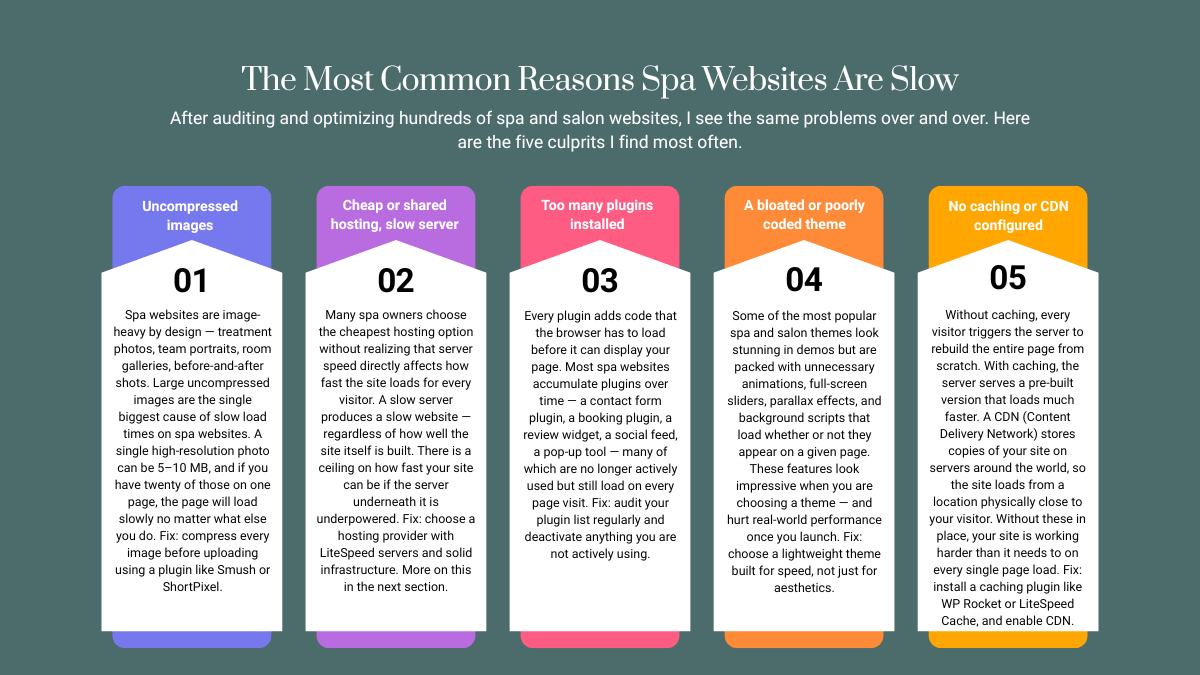
After auditing and optimizing hundreds of spa and salon websites, I see the same problems over and over. Here are the five culprits I find most often.
Uncompressed images. Spa websites are image-heavy by design — treatment photos, team portraits, room galleries, before-and-after shots. Large uncompressed images are the single biggest cause of slow load times on spa websites. A single high-resolution photo can be 5–10 MB, and if you have twenty of those on one page, the page will load slowly no matter what else you do. Fix: compress every image before uploading using a plugin like Smush or ShortPixel.
Cheap or shared hosting on a slow server. Many spa owners choose the cheapest hosting option without realizing that server speed directly affects how fast the site loads for every visitor. A slow server produces a slow website — regardless of how well the site itself is built. There is a ceiling on how fast your site can be if the server underneath it is underpowered. Fix: choose a hosting provider with LiteSpeed servers and solid infrastructure. More on this in the next section.
Too many plugins installed. Every plugin adds code that the browser has to load before it can display your page. Most spa websites accumulate plugins over time — a contact form plugin, a booking plugin, a review widget, a social feed, a pop-up tool — many of which are no longer actively used but still load on every page visit. Fix: audit your plugin list regularly and deactivate anything you are not actively using.
A bloated or poorly coded theme. Some of the most popular spa and salon themes look stunning in demos but are packed with unnecessary animations, full-screen sliders, parallax effects, and background scripts that load whether or not they appear on a given page. These features look impressive when you are choosing a theme — and hurt real-world performance once you launch. Fix: choose a lightweight theme built for speed, not just for aesthetics.
No caching or CDN configured. Without caching, every visitor triggers the server to rebuild the entire page from scratch. With caching, the server serves a pre-built version that loads much faster. A CDN (Content Delivery Network) stores copies of your site on servers around the world, so the site loads from a location physically close to your visitor. Without these in place, your site is working harder than it needs to on every single page load. Fix: install a caching plugin like WP Rocket or LiteSpeed Cache, and enable CDN.
How to Check If Your Spa Website Is Too Slow
Before you fix anything, you need a baseline. Two free tools will give you everything you need.
Google PageSpeed Insights (pagespeed.web.dev) tests your site and gives you a score from 0 to 100. Aim for 80 or above on mobile — that is a solid score. 90 or above is excellent. Anything below 50 needs attention.
GTmetrix (gtmetrix.com) gives you a letter grade (A through F) along with your actual load time and a breakdown of what is slowing the page down. Aim for a Grade A or B, with a total load time under 3 seconds.
If your score is low, do not panic — most spa websites I audit start below 60, and the fixes are simpler than you think. The diagnostic report these tools generate will tell you exactly where the biggest problems are.
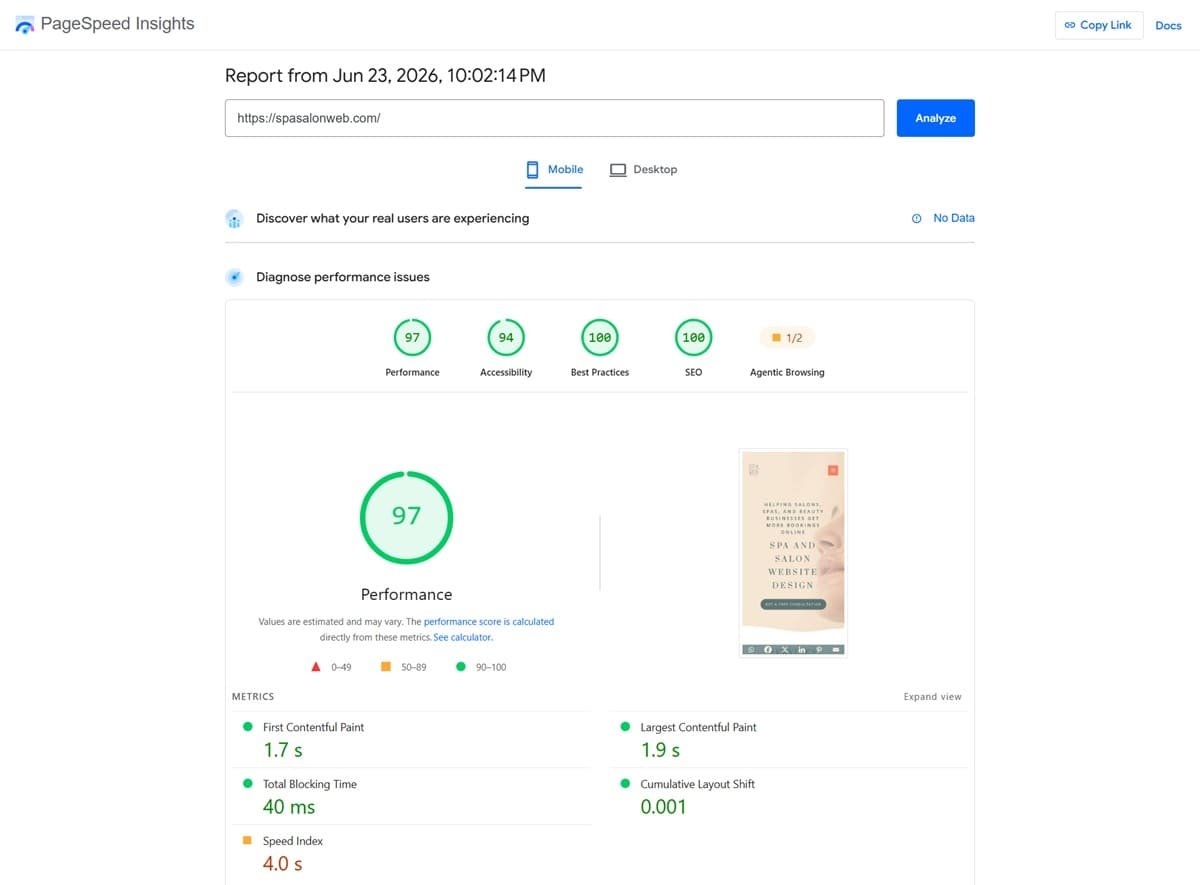
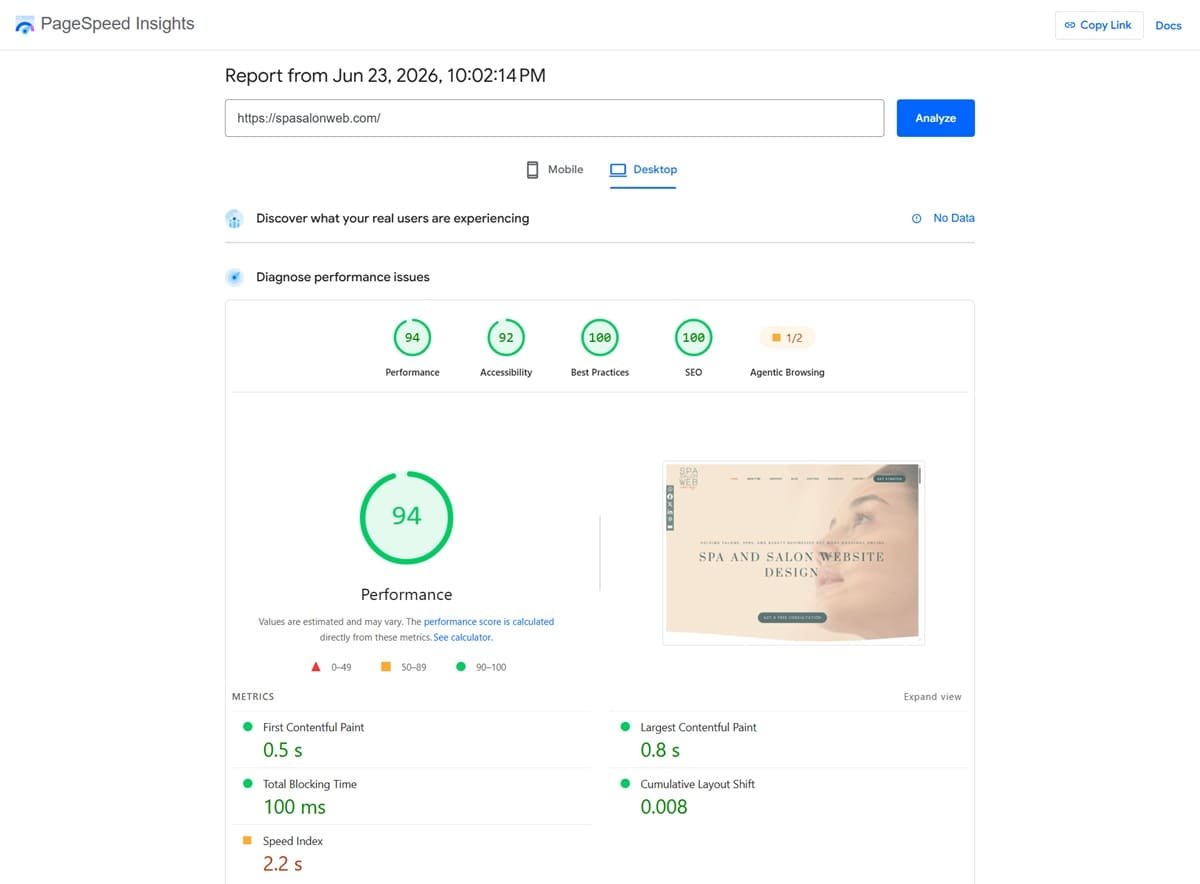
SpaSalonWeb.com PageSpeed score — hosted on Hostinger Premium plan.
How to Fix a Slow Spa Website (What I Do on Every Project)
Here are the five fixes I apply on every spa website optimization project, ranked from highest impact to lowest.
Fix 1: Switch to fast hosting. This is the single highest-impact change you can make to your site speed. A better server changes the baseline for everything else. I personally recommend Hostinger — they use LiteSpeed servers, offer affordable pricing, and the WordPress setup is straightforward. SpaSalonWeb.com itself runs on Hostinger and consistently scores 90+ on Google PageSpeed. If you are currently on cheap shared hosting and wondering why your site is slow, this is likely the core problem. Best Web Hosting for Salon Websites in 2026 (Honest Comparison)
Fix 2: Compress all images. Install Smush or ShortPixel and run a bulk compression pass on your entire media library. Enable lazy loading at the same time — this makes images load only when the visitor scrolls to that part of the page, rather than loading everything at once. On image-heavy spa websites, image compression alone can cut load time by 30–50%.
Fix 3: Install a caching plugin. If you are on Hostinger, install LiteSpeed Cache — it integrates natively with their servers. For any other host, WP Rocket is the best premium option. Caching serves pre-built pages to visitors instead of rebuilding from scratch each time. Setup takes under 10 minutes and the impact is immediate.
Fix 4: Remove unused plugins and scripts. Go to your WordPress plugin list and deactivate anything you are not actively using today. Do not just deactivate — delete them. Each removed plugin reduces the code your site loads for every visitor, reducing page weight and improving speed.
Fix 5: Enable a CDN. Hostinger includes a free CDN on their Business plans. If you are on another host, Cloudflare offers a solid free CDN tier that works with any hosting provider. A CDN is especially important if your spa has clients or visitors in different cities or countries — it ensures the site loads fast regardless of where they are located.
Tools I Use to Keep Spa Websites Fast
Tool | What It Does | Free or Paid |
|---|---|---|
Hostinger | Fast LiteSpeed hosting for WordPress | Paid (affordable) |
LiteSpeed Cache | Caching plugin | Free |
Smush | Image compression plugin | Free tier available |
ShortPixel | Image compression | Paid, affordable |
WP Rocket | Premium caching plugin | Paid |
Google PageSpeed Insights | Speed testing and scoring | Free |
GTmetrix | Speed testing and full diagnosis | Free tier |
Cloudflare | CDN and security layer | Free tier |
Your Spa Website Speed Is Part of Your Brand
Speed is not a technical luxury you can put off until later. It is a direct factor in how many bookings your spa gets every week — through search rankings, first impressions, and whether clients wait long enough to see your booking page at all.
A fast website is not just better for Google. It is better for the experience you are trying to create. If someone is considering a visit to your spa for relaxation, a frustrating website experience works against everything your brand stands for.
If you want me to check your spa website speed and tell you exactly what is slowing it down, reach out or find me on Fiverr — I offer full website audits and speed optimization as a service.
Frequently Asked Questions — why every spa needs a fast website
Q1: How fast should my spa website load?
A: The target is under 3 seconds on mobile, ideally under 2 seconds. Google PageSpeed scores of 80 or above on mobile are solid. Anything over 5 seconds is actively losing you visitors and bookings. Most spa websites I work on have significant room to improve, and they get there with the fixes described in this post.
Q2: Will switching hosting really make my site faster?
A: Yes — and it is often the most impactful single change you can make. Your hosting server is the foundation your entire site sits on. If the server is slow, your site is slow, regardless of how well everything else is configured. LiteSpeed-based hosting like Hostinger can dramatically improve load time, especially when combined with a caching plugin.
Q3: My website looks fine to me — does speed still matter?
A: What you see when you load your own site is almost always faster than what a new visitor experiences — your browser has cached files, your internet connection may be faster, and you are likely closer geographically to your server. Run your site through Google PageSpeed Insights or GTmetrix and check your actual score. What you see and what your clients experience are often very different.
Q4: Can I speed up my website without hiring a developer?
A: For several of these fixes, yes. Installing a caching plugin, compressing images with Smush, and removing unused plugins are all things a non-technical website owner can do without coding knowledge. Switching hosting or choosing a better theme involves a bit more, but it is manageable. Where a developer adds real value is in diagnosing the specific issues on your site and prioritizing fixes correctly — so you are not wasting time on things that will not move the needle.