You are two days away from launching your new salon website. The design looks great, your photos are uploaded, and your domain is live. But here is the question most salon owners never ask at this stage: is it actually ready?
Will it bring in real bookings — or will it quietly sit online doing nothing?
I am Nreepen KM Dony, a WordPress developer with over 10 years of experience building websites exclusively for spas, salons, massage businesses, and barber shops. I have built and launched over 300 of these websites for clients around the world through my Fiverr profile.
This post is the exact Salon website checklist. I run through before going live on every single project.
This is not a generic website checklist you will find everywhere online. Every item on this list comes from real experience building and launching spa and salon websites for clients around the world.
If you are about to launch — or you already launched and your site is not performing — go through every item below. By the end, you will know exactly what is working and what is silently costing you bookings. Salon website mistakes.
Disclosure: This post recommends tools and services based on personal use and experience. If I join an affiliate program for any of these in the future, I’ll clearly mark those links as affiliate links.
Why Most Salon Websites Fail Before They Even Get Started
The honest truth is that most salon websites are launched incomplete. Not because the owner did not care — but because nobody told them what “complete” actually means for a salon website.
There are three patterns I see constantly:
Launched without testing on mobile devices. Most of your potential clients are browsing on their phones. If your booking button is cut off or your text is unreadable on a small screen, they leave — and they do not come back.
Missing key trust elements. No real photos. No reviews. No team bio. Visitors do not book with a website they do not trust, and trust is built through specific elements — not just good design.
No clear booking path. A visitor lands on your homepage and has no idea what to do next. There is no obvious button, no clear call to action, no path to a booking. So they leave.
In my experience, 8 out of 10 salon websites I audit for the first time are missing at least 3 items from this checklist — and those missing items are directly hurting their bookings.
Let me walk you through every item, category by category.
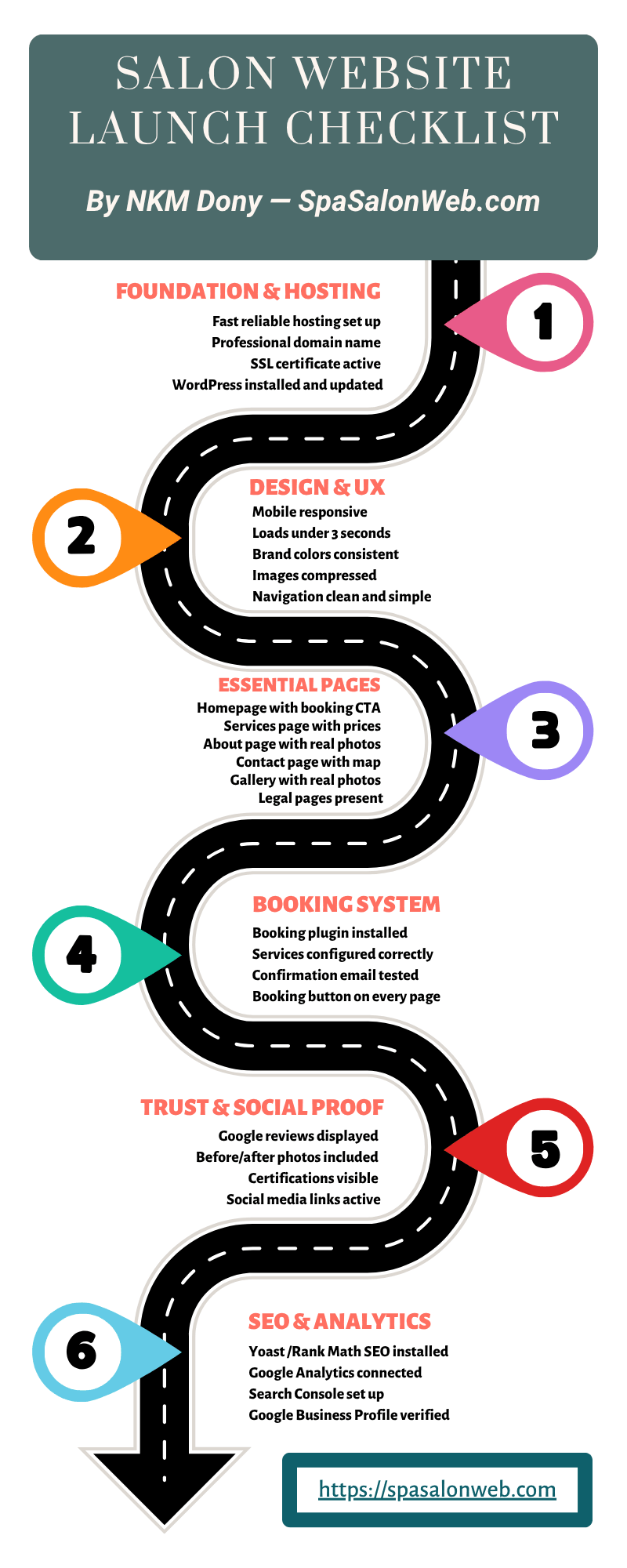

Foundation & Hosting Checklist
Fast and reliable hosting is set up
Your hosting provider is the foundation everything else sits on. A slow host means a slow website — and a slow website directly reduces the number of people who book with you. Google has confirmed that most mobile users leave a site that takes more than 3 seconds to load.
I personally recommend and use Hostinger for every salon website I build — including SpaSalonWeb.com, which consistently scores 90+ on Google PageSpeed. The performance is reliable, the price is competitive, and their support is solid. Best Web Hosting for Salon Websites in 2026 (Honest Comparison)
This is an affiliate link — I earn a small commission if you sign up at no extra cost to you.
Domain name is professional and memorable
Your domain should ideally include your salon name or your city — something like “bloomsalonmiami.com” rather than “bloom-salon-miami-2026.com.” Hyphens and numbers make domains harder to remember and harder to type correctly. A clean, short domain name is worth the extra effort to find.
A .com extension is still the most trusted option for a business website in 2026. If your .com is taken, try adding your city name before going with an alternative extension.
SSL certificate is active
Every single page of your website must load with https — not http. The padlock icon in the browser bar is not just a technicality. Google actively labels non-SSL sites as “Not Secure”, and visitors see that warning the moment they land. That alone can stop a potential client from booking.
If you are on Hostinger, SSL is included on all plans and activated automatically. If you are on another host, check your control panel or contact their support to get it enabled before going live.
WordPress is installed and updated
Always launch on the latest version of WordPress. Running an outdated version is a security risk — it leaves your website open to attacks that target known vulnerabilities in older releases. It also causes plugin compatibility issues that can break your booking system at the worst possible time.
Before launch, check the WordPress dashboard and update the core, all plugins, and your theme to their latest versions.

Design & User Experience Checklist
Website is fully responsive on mobile
Responsive means your website automatically adjusts to fit any screen — phone, tablet, desktop. Test on at least three different physical devices before you go live, not just a browser preview. Pay particular attention to your booking button — it must be clearly visible and easy to tap on a small screen without zooming in.
If any element is cut off or overlapping on mobile, fix it before launch. Not after.
Website loads in under 3 seconds on mobile
Run your website through Google PageSpeed Insights and GTmetrix before going live. If your mobile score is below 80, you have speed issues that will cost you bookings — and you should fix them before launch, not as a future task.
The most common causes of slow salon websites are large uncompressed images and too many plugins running at once.
Brand colors, fonts, and logo are consistent
Every page of your website should feel like the same brand. If your homepage uses a soft pink palette and your booking page looks completely different, it signals inconsistency — and that reduces trust immediately. Before launch, check every page side by side and confirm the colors, fonts, and logo placement are uniform throughout.
All images are compressed and optimized
Uncompressed images are the number one cause of slow spa and salon websites. A single high-resolution photo straight from your phone or camera can be 5MB or larger. Multiply that by ten images on a page and you have a site that loads like it is stuck in 2010.
Use Smush or ShortPixel — both are free WordPress plugins — to compress every image before you go live. A properly compressed image should be under 200KB without any visible loss in quality.
Navigation is clean and simple
Visitors should be able to find any page within two clicks. If someone has to hunt for your services page or search for how to contact you, they are gone. Keep your main navigation simple and predictable: Home, Services, About, Gallery, Contact, Book Now.
That Book Now item in the navigation should stand out visually — use your brand’s accent color or a button style to make it impossible to miss.
Essential Pages Checklist
Homepage with a clear headline and booking CTA
Your homepage has one job: tell the visitor what you do, who you serve, and how to book — all before they have to scroll. This is called “above the fold” content and it is the most valuable real estate on your entire website.
The booking button must be bold, high-contrast, and placed immediately in the hero section. Do not bury it below testimonials or a long paragraph about your history.
Services page with descriptions and prices
Every service you offer needs four things listed clearly: the name of the service, a short description, the duration, and the price. If any of these are missing — especially the price — new clients will not book. No prices means no bookings from first-time visitors who have no idea what to expect.
Think of your services page as your menu. Nobody orders from a restaurant with no prices on the menu.
About page with a real story and team photos
Clients book with people they trust. Your About page is where that trust is either built or lost. Include the owner’s real story, team photos with names and roles, how many years the business has been running, and any relevant certifications or training.
A generic “We are passionate about beauty” paragraph does nothing. Be specific, be real, and show your face.
Contact page with address, phone, and map
Your contact page must include your full address, phone number, email, and a Google Maps embed so clients can find you without confusion. Add your business hours clearly — missing or outdated hours is one of the most common complaints I hear from salon website visitors.
If you offer parking or have a specific entrance clients should use, include that too. Remove any friction between the visitor and their first visit.
Gallery page with real photos
Real photos of your salon interior, your team at work, and the results you deliver are essential for building trust before someone books. Stock photos do not do this — they actually hurt credibility because experienced clients recognize them.
Aim for a minimum of 12 high-quality photos before launch. If you do not have professional photos yet, even good smartphone photos taken in natural light are far better than stock imagery.
Legal pages — Privacy Policy, Terms & Conditions, Disclaimer
These pages are not optional. They are required for GDPR compliance and are often a condition for approval in affiliate programs. If you ever want to run Google Ads or get approved for a hosting affiliate program, missing legal pages will get you rejected immediately.
Use a free generator like Termly or TermsFeed if you need a starting point — but do not skip these pages. They take 30 minutes to set up and protect you long term.

Booking System Checklist
Online booking plugin is installed and tested
For WordPress salon websites, I recommend either Amelia or Bookly — both are purpose-built for appointment-based businesses and integrate smoothly with most salon and spa setups. Whichever plugin you choose, test the entire booking flow yourself before launch. Make a real test booking, go through every step, and confirm it works exactly as a client would experience it.
Do not assume it works just because it is installed.
Services and availability are configured correctly
Every service listed on your services page must be bookable through the system — with accurate durations and correct time slots. If your booking calendar shows availability during times that are already filled, clients will book those slots and you will have a problem on your hands immediately after launch.
Go through your schedule configuration manually before going live and confirm every detail is accurate.
Confirmation email is set up and tested
Every completed booking must trigger an automatic confirmation email to the client with the date, time, service, and location details. This is not just a nice-to-have — a missing confirmation email feels unprofessional and causes cancellations because clients are not sure the booking went through.
Test this yourself. Make a test booking with your personal email and confirm the confirmation arrives within a minute.
Booking button appears on every key page
Never make a visitor search for how to book. The booking button should appear in the homepage hero, on the services page, on the contact page, and ideally in a sticky mobile header that follows the user as they scroll. Every time a visitor is ready to take action, the path forward should be immediately in front of them.

Trust & Social Proof Checklist
Real client reviews are displayed
Google reviews are the most trusted form of social proof for local businesses. Embed them on your homepage using a plugin like WP Google Review Slider or Widgets for Google Reviews. Aim for a minimum of 5 real reviews visible before launch — and the more the better.
Do not write fake reviews. Clients can tell, and it destroys credibility the moment someone notices.
Before and after photos are included
Before and after photos are the single most powerful trust builder for salon and spa websites. They show the actual result a client can expect — which is exactly what someone on the fence needs to see before they commit to a booking.
Even 3 to 4 strong before and after photos make a significant difference to your conversion rate. If you have them, display them prominently on the homepage and services page.
Certifications and awards are displayed
Any relevant certifications, training credentials, industry memberships, or awards should be visible — ideally on your About page and homepage. These details separate a professional salon from a generic competitor who has no credentials on display.
If you have been featured in a local publication or won a local business award, display that too. Social proof from third parties carries more weight than anything you say about yourself.
Social media links are active and updated
Link only to social media profiles that are currently active and regularly updated. A dead Instagram or Facebook page linked from your website hurts your credibility more than having no link at all. A visitor who clicks through and sees posts from 18 months ago will immediately question whether the business is still operating.
If a profile is not active, remove the link until it is.

SEO & Analytics Checklist
Yoast SEO or Rank Math is installed
Every page on your website needs a unique SEO title and meta description before you go live. These are the text snippets that appear in Google search results — they directly affect whether someone clicks on your site or scrolls past it.
Use location-based keywords naturally throughout your content. “Nail salon in Austin” is far more effective for local search than just “nail salon.” Your plugin will guide you through setting these up for each page.
Google Analytics is connected
Install MonsterInsights or connect GA4 directly to your WordPress site before launch. You cannot improve what you do not measure. From day one you need to know where your visitors are coming from, which pages they spend time on, and where they are dropping off before booking.
Without this data, you are guessing.
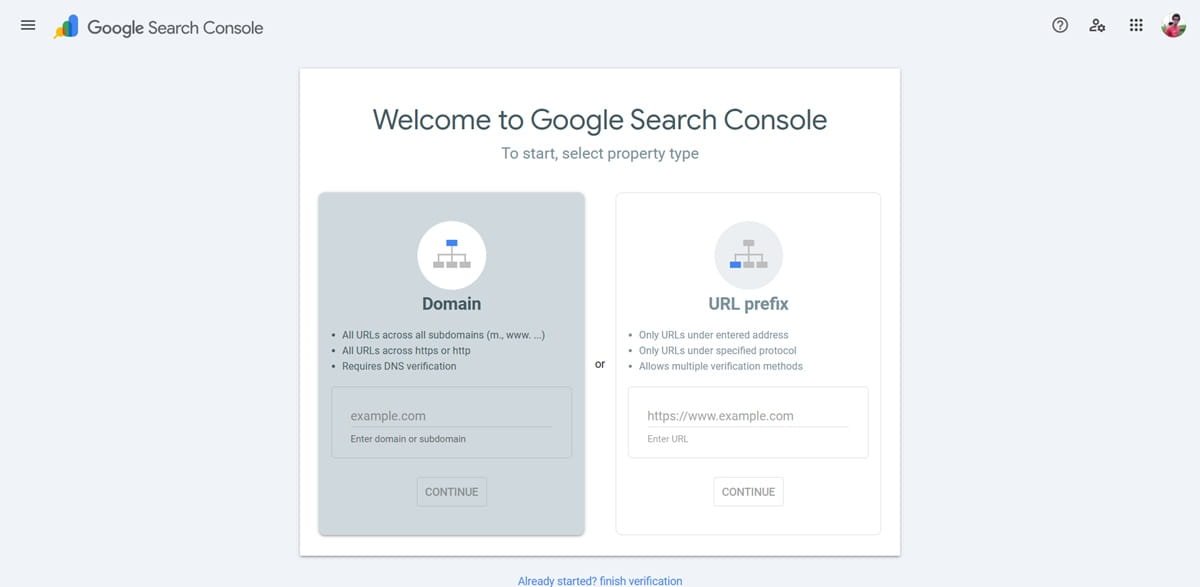
Google Search Console is set up
Immediately after launch, submit your sitemap to Google Search Console. This is how you formally tell Google that your website exists and should be indexed. Without it, Google may still find your site eventually — but submitting the sitemap makes the process faster and gives you visibility into any crawl errors.
Go to Google Search Console, add your property, and submit your sitemap URL (usually yoursite.com/sitemap.xml).
Google Business Profile is created and verified
This is the single most important local SEO step for any salon or spa business. A verified Google Business Profile means your salon appears on Google Maps when someone nearby searches “salon near me” or “spa in [your city].” That is free, highly visible, local traffic that requires no ongoing ad spend.
If you do not have a verified profile yet, set this up the same week your website launches.
Before You Hit Publish — Final Pre-Launch Check
You are 30 minutes from going live. Run through these five items one final time before you click publish:
- Run Google PageSpeed Insights one final time — your mobile score must be 80 or above before you launch.
- Make a real test booking end to end and confirm the confirmation email arrives in your inbox within a minute.
- Check every single page on a real smartphone — not a browser preview. Tap through the navigation, check the booking button, read the text.
- Confirm SSL is active — https should appear in the URL on every page, not http.
- Check all contact details are correct — phone number, physical address, and business hours.
If everything on this list is checked, your salon website is ready to launch and start bringing in bookings.
What to Do in the First 30 Days After Launch
Share on all social media platforms immediately
The same day your website goes live, post about it on Instagram, Facebook, and any other platform your salon is active on. Show the homepage, share the booking link, and let your existing clients know they can now book online. Ask friends, family, and loyal clients to share the post and leave you a Google review — those early reviews carry significant weight.
Monitor Google Analytics weekly
Every week for the first 30 days, check where your traffic is coming from and which pages visitors spend the most time on. If people are landing on your homepage but not clicking through to the booking page, that tells you something needs to change — either the CTA is not clear enough or the page is not building enough trust.
Use this data to make real decisions, not guesses.
Ask every new client how they found you
This is the simplest ROI measurement available to any salon owner. When a new client comes in, ask how they found you. If they mention your website, you know it is working. Track this consistently over the first 30 days and you will have a clear picture of whether your online presence is generating real business.
Update content regularly
Add new photos, update service prices when they change, and publish at least one blog post per month. Fresh, updated content signals to Google that your website is active and relevant — which directly affects how often it appears in search results. A website that never changes is treated as less relevant than one that is regularly maintained.
Your Salon Website Is Ready — Now Make It Work for You
A complete, well-built salon website is the most powerful marketing tool a salon owner has. It works 24 hours a day, seven days a week, reaching potential clients while you are busy with appointments. But it only works if every item on this checklist is in place — a half-built website does half the job, or none at all.
The difference between a salon website that generates bookings consistently and one that just sits there is not luck. It is the details on this checklist.
If you want me to go through this checklist with you personally, or build your salon website from scratch with everything already in place, find me on Fiverr — I have done this for 300+ salon and spa clients and I know exactly what it takes to launch a site that converts.
Frequently Asked Questions — Salon website checklist
How long does it take to complete this checklist?
A: If you are building the website yourself from scratch, expect 2 to 4 weeks to complete everything properly. Rushing through the checklist to launch faster almost always means going back to fix things that are directly hurting your bookings. If you hire a developer, a properly built salon website typically takes 7 to 14 days depending on the scope.
Do I need a developer to launch a salon website?
A: Not necessarily — but the more complex your needs, the more a developer saves you time and avoids costly mistakes. Page builders like Elementor make it possible for non-technical owners to build a basic site. However, speed optimization, booking system configuration, and SEO setup are areas where getting things wrong is easy and the consequences are real. A one-time investment in a professional often pays for itself quickly in bookings.
Which item on this checklist is most important?
A: If I had to pick one, it would be the booking system being fully tested before launch. A beautiful website that does not take bookings is not a business tool — it is just a digital brochure. The booking system is the point where interest becomes revenue, and any friction or failure there directly costs you money.
How much does it cost to launch a salon website with everything on this list?
A: A properly built WordPress salon website with all checklist items covered typically costs between $300 and $800 USD for a professional build on Fiverr, plus hosting (Hostinger plans start from around $3/month) and any premium plugin licenses if needed. DIY is cheaper upfront but costs time — and time spent on website problems is time not spent on clients. Budget for doing it right the first time.