
76% of people who search for a local business on their smartphone visit that business within 24 hours. For a salon owner, that means every day your website isn’t showing up on Google is a day full of potential clients finding your competitors instead of you.
I’ve built and optimized 300+ salon and spa websites. The single most common frustration I hear from salon owners after their website goes live isn’t about the design or the booking system — it’s this: “Dony, nobody is finding me on Google.”
If you’re wondering how to get salon website on Google, this guide will walk you through the exact process. You’ll learn 10 proven SEO strategies, in the right order, using mostly free tools. By the end, you’ll know exactly what to do to improve your local rankings, attract more clients, and get your salon found in your city.
Disclosure: This post recommends tools and services based on personal use and experience. If I join an affiliate program for any of these in the future, I’ll clearly mark those links as affiliate links.
How Google Decides Which Salons to Show
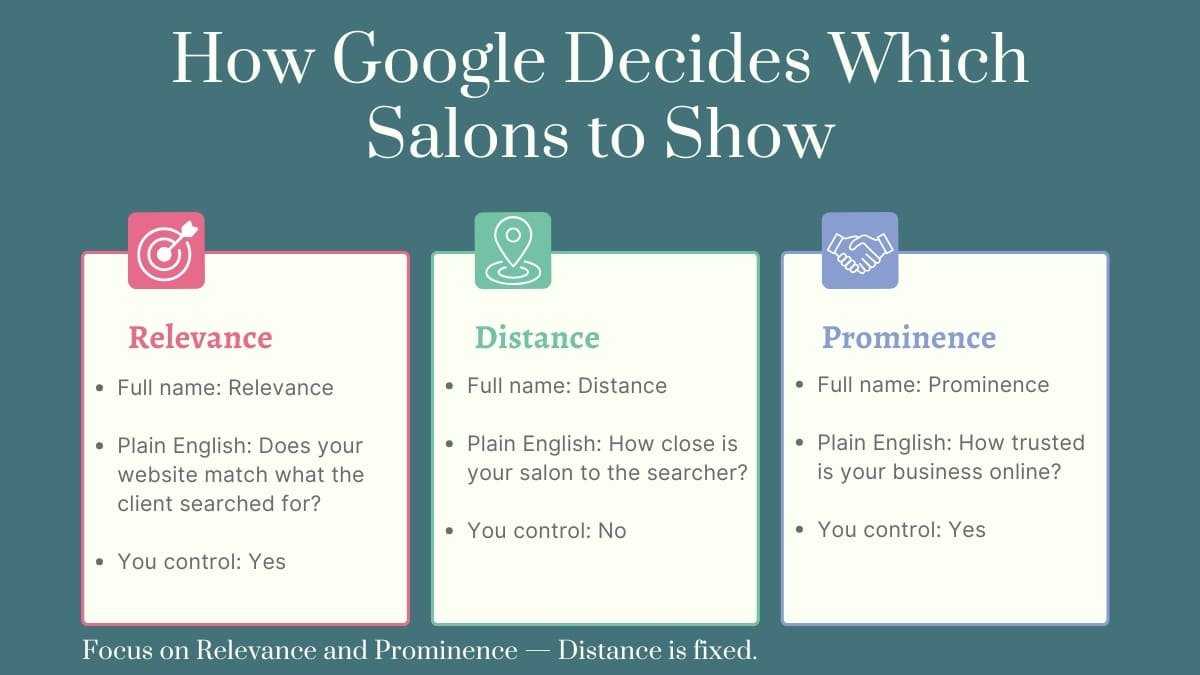
Before the steps, you need to understand one thing: Google uses three factors to decide which salons appear in local search results.
Relevance — Does your website clearly tell Google what you do and where you do it? A salon website that mentions “hair color” and “Manchester” is more relevant to someone searching “hair salon Manchester” than one that just says “beauty services.”
Distance — How physically close is your salon to the person searching? This is the one factor you can’t control — your location is your location.
Prominence — How well-known and trusted is your business online? Reviews, citations, backlinks, and an active Google Business Profile all build prominence.
Distance you can’t change. Relevance and prominence you absolutely can — and that’s exactly what the 8 steps below address.
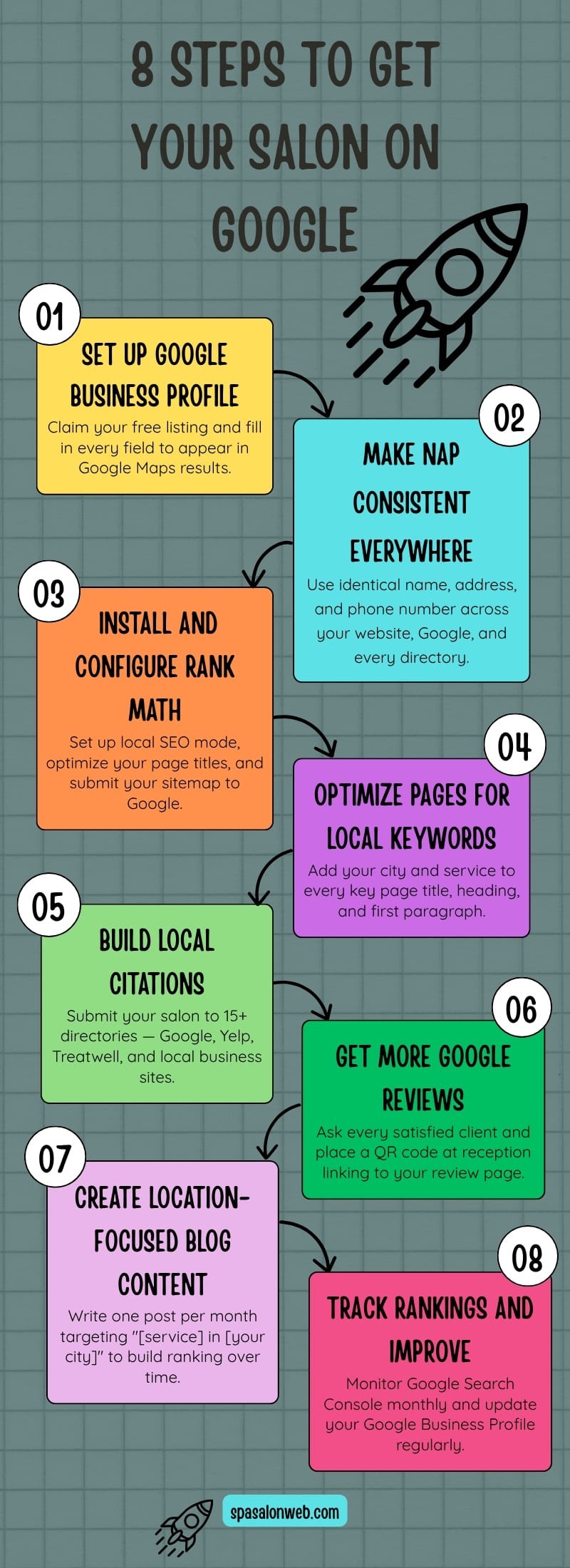
8 Steps to Get Your Salon Website on Google
Step 1 — Set Up and Optimize Your Google Business Profile
What it is: Your free business listing on Google — the most powerful local SEO tool available to any salon owner.
Why it matters for salons: Google Business Profile is what gets your salon into the Google Maps 3-pack — the three businesses shown at the very top of local search results with a map. Appearing there is worth more than ranking on page one of regular Google results. Clients searching “hair salon near me” see the Maps pack first, before any website.
How to do it:
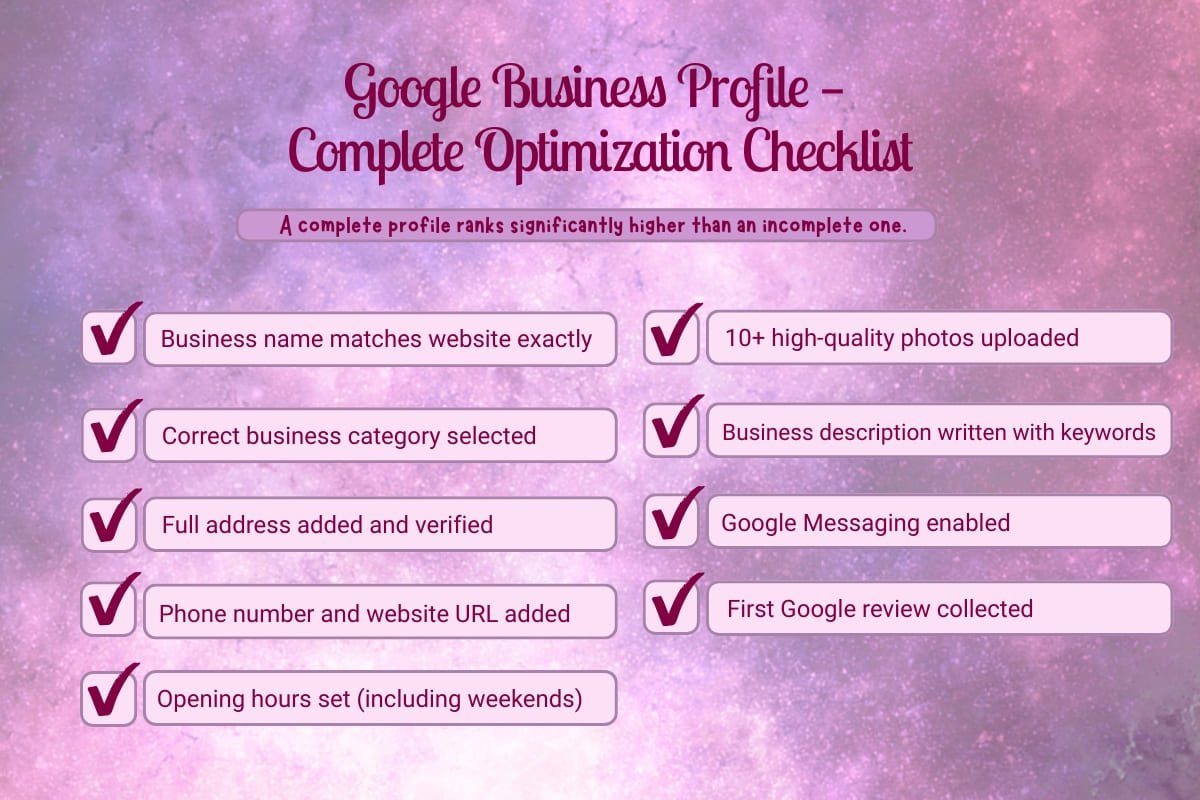
- Go to business.google.com and sign in with your Google account
- Search for your salon name — claim it if it already exists, create it if it doesn’t
- Choose the most accurate business category:
- Hair salon → Hair Salon
- Day spa → Day Spa
- Nail studio → Nail Salon
- Massage center → Massage Therapist
- Beauty salon → Beauty Salon
- Add your exact address — match it exactly to how it appears on your website
- Add your phone number and website URL
- Set your opening hours accurately — including Saturday and Sunday
- Upload at least 10 high-quality photos: salon interior, exterior, treatment rooms, staff, and examples of your work
- Write a business description (750 characters max) — include your main services and city name naturally
- Enable Google Messaging — lets clients message you directly from your Google listing
Expected result: Your salon starts appearing in Google Maps results for local searches within 2–4 weeks of full optimization.
Step 2 — Make Your NAP Consistent Everywhere
What it is: NAP stands for Name, Address, Phone number — the three pieces of information Google uses to verify your business is real and trustworthy.
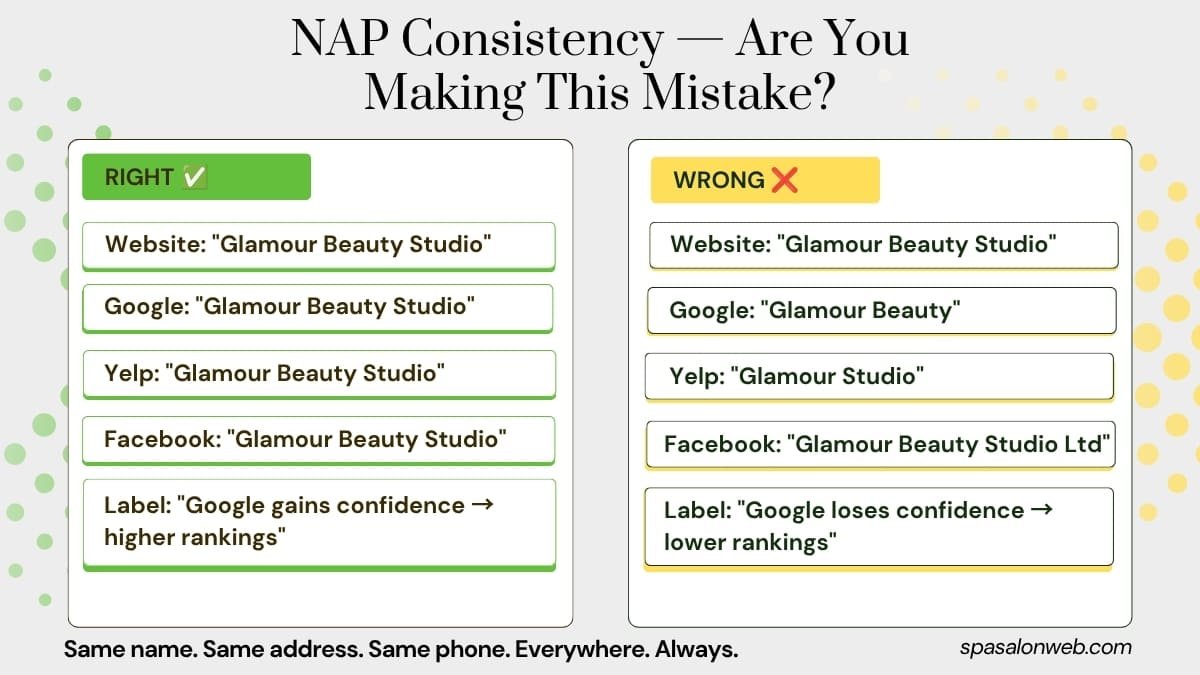
Why it matters for salons: Google cross-references your business information across dozens of websites — your website, Facebook, Yelp, TripAdvisor, local directories. If your salon is called “Glamour Beauty Studio” on your website but “Glamour Beauty” on Yelp and “Glamour Studio” on Facebook — Google loses confidence in your business data and ranks you lower than competitors with consistent information.
How to do it:
- Write down your exact business name, address, and phone number as you want them to appear everywhere
- Check and update each platform:
- Your WordPress website — footer and contact page
- Google Business Profile
- Facebook business page
- Instagram bio
- Yelp
- TripAdvisor
- Any other directory your salon appears on
- Make them identical — same spelling, same punctuation, same phone format, same address abbreviations
The detail that catches most salon owners: If your address is “123 High Street” on your website, don’t write “123 High St” on Yelp. Google sees these as different addresses.
Expected result: Stronger local search signals and improved Google confidence in your business information — typically visible in rankings within 4–6 weeks.
Step 3 — Install and Configure Rank Math SEO
What it is: A free WordPress plugin that tells Google exactly what your salon does, where you’re located, and which searches you want to appear for.
Why it matters for salons: Without an SEO plugin, your salon website is essentially whispering to Google. Rank Math gives you a megaphone — structured data, optimized titles, meta descriptions, local business schema, and a direct line to Google Search Console all in one free plugin.
How to do it:
- Go to Plugins → Add New → search Rank Math SEO → Install → Activate
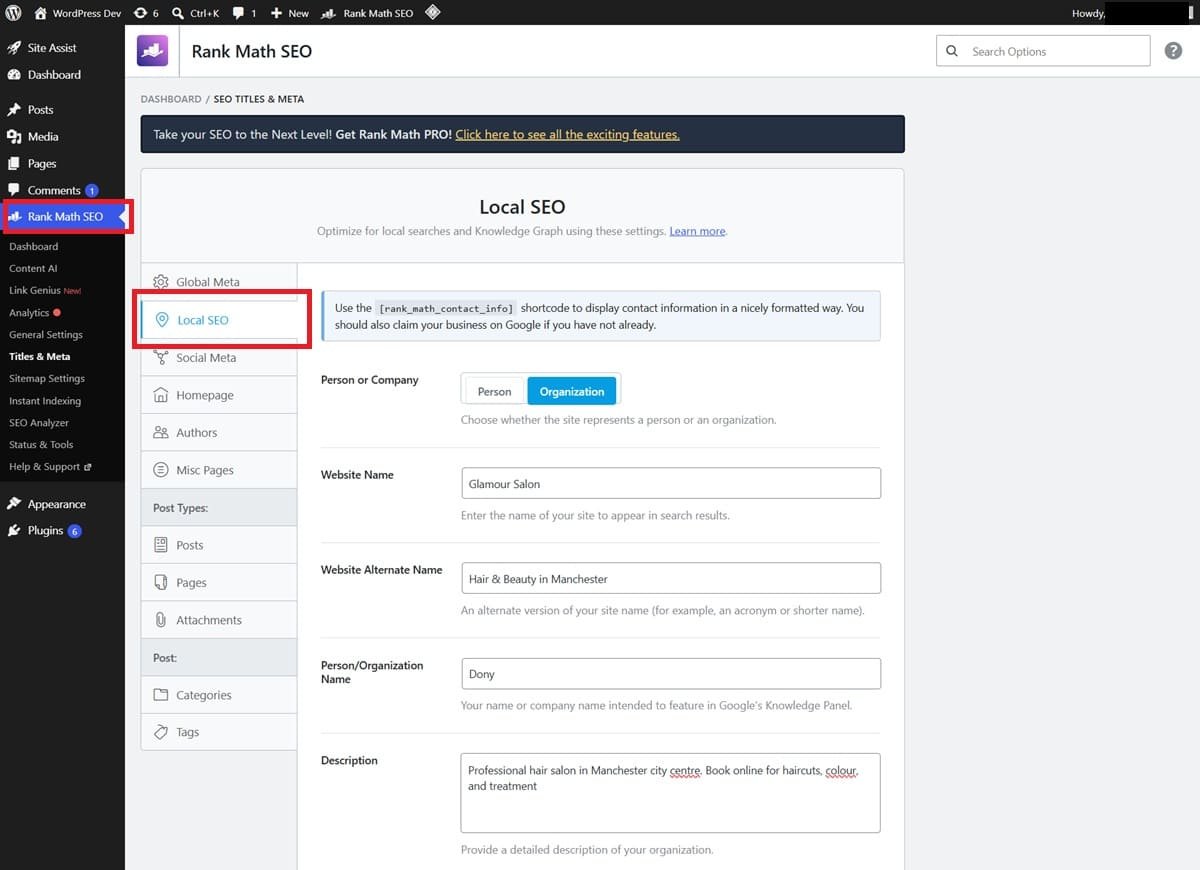
- Run the setup wizard — select Local SEO mode when prompted
- Set your homepage SEO title:
- Format: [Salon Name] — [Main Service] in [City]
- Example: “Glamour Salon — Hair & Beauty in Manchester”
- Set your homepage meta description:
- Include your main service, city, and a clear benefit
- Example: “Professional hair salon in Manchester city centre. Book online for haircuts, colour, and treatments.”
- Enable the Local SEO module in Rank Math:
- Go to Rank Math → Modules → enable Local SEO
- Add your business name, address, phone, opening hours, and coordinates
- This adds structured data that helps Google show your address and hours directly in search results
- Submit your sitemap to Google Search Console:
- Go to search.google.com/search-console
- Add your website property
- Submit your sitemap URL: yourdomain.com/sitemap_index.xml
Expected result: Google clearly understands your salon’s services and location — a foundational improvement that every other SEO step builds on.
Step 4 — Optimize Your Key Pages for Local Keywords
What it is: Adding your city and service keywords naturally to your most important website pages so Google ranks them for local searches.
Why it matters for salons: A page that says “we offer haircuts” ranks for nothing locally. A page that says “professional haircuts in Manchester city centre” tells Google exactly which searches it should appear for.
Local keyword formula for salons: [Service] + [City/Neighbourhood]
- “hair salon in Manchester”
- “balayage specialist Birmingham”
- “massage therapy London”
- “nail salon near Canary Wharf”
How to optimize each page:
Homepage:
- Focus keyword: “[main service] in [city]”
- Include in: page title, first paragraph, one H2 heading, meta description
- Example first paragraph: “Welcome to Glamour Salon — Manchester’s go-to destination for professional hair colour, cuts, and treatments in the heart of the city centre.”
Services page:
- Create a separate section or page for each main service
- Optimize each for its own local keyword
- Example: balayage page optimized for “balayage in Manchester”
About page:
- Mention your city and neighborhood naturally throughout
- “We’ve been serving clients in Manchester’s Northern Quarter since 2018”
Contact page:
- Write your full address as text on the page — not just in an image or map embed
- Embed a Google Map showing your exact location
- Include your phone number as a clickable link
In Rank Math: Set a focus keyword for every page. Aim for a Rank Math score of 80+ on each key page before publishing.
Expected result: Each optimized page creates a specific ranking opportunity for its local service keyword — results build over 4–8 weeks.
Step 5 — Build Local Citations
What it is: Getting your salon’s name, address, and phone number listed on other reputable websites — even without a link back to your site.
Why it matters for salons: Google treats citations like votes of confidence in your business’s legitimacy. The more consistent, reputable sources confirm your salon exists at your address — the more Google trusts you and ranks you higher in local results.
Free directories to submit to immediately:
General directories:
- Google Business Profile (Step 1 — already done)
- Bing Places for Business (bingplaces.com)
- Yelp (yelp.com/biz/add)
- Foursquare (foursquare.com)
- Apple Maps (mapsconnect.apple.com)
- Facebook Business page
Beauty-specific directories:
- Treatwell
- Vagaro
- StyleSeat
- Booksy
- Fresha
Local directories:
- Your city’s official business directory
- Local chamber of commerce website
- Local neighborhood or community websites
How to do it efficiently: Work through this list over one week — 3–4 directories per day. Use exactly the same NAP information you standardized in Step 2. Keep a spreadsheet tracking where you’ve submitted and your login details for each.
For salon owners who want to accelerate this process — BrightLocal and Whitespark are paid tools that automate citation building across hundreds of directories simultaneously.
Expected result: 15–20 consistent citations is enough to see meaningful local ranking improvement for most salon businesses — results typically visible within 2–3 months.
Step 6 — Get More Google Reviews the Right Way
What it is: Building a consistent system for collecting genuine Google reviews from real clients.
Why it matters for salons: Reviews are one of the strongest signals Google uses for local rankings. A salon with 80 reviews at 4.8 stars will almost always outrank a salon with 12 reviews at 4.9 stars — even if the latter salon has a better website. More reviews, consistently collected, directly improve your position in the Google Maps 3-pack.
How to build a review system:
In the salon:
- Ask every satisfied client directly before they leave: “Would you mind leaving us a Google review? It really helps small businesses like ours.”
- Create a QR code linking to your Google review page — display it at reception, on your mirror, and on your business cards. Free QR codes at qr-code-generator.com
After the appointment:
- Send a follow-up text or email within 24 hours with a direct link to your Google review page
- BookingPress and Amelia both support automated follow-up messages — use them
Responding to reviews:
- Respond to every review — positive and negative
- For positive reviews: thank them by name and mention a specific service
- For negative reviews: acknowledge the issue professionally, apologize genuinely, offer to make it right offline
- Never argue with a negative review publicly
One rule that cannot be broken: Never buy fake reviews. Google’s algorithm detects sudden spikes in reviews from accounts with no history. The penalty — being removed from Google Maps entirely — is not worth the risk.
Expected result: Every new genuine review improves your local ranking position. Salons that consistently collect reviews typically see meaningful Maps ranking improvements within 60–90 days.
Step 7 — Create Location-Focused Blog Content
What it is: Writing blog posts that target local keywords your potential clients are searching for — building your salon’s relevance and authority in Google’s eyes over time.
Why it matters for salons: Every blog post is an additional ranking opportunity. A post optimized for “best balayage salon in Manchester” can bring in local clients searching exactly that term — for months or years after you publish it, with zero ongoing cost.
Local content ideas for salon blogs:
Direct local keyword posts:
- “Best Hair Salons in [City] — What to Look For”
- “Where to Get a Facial in [City] — My Honest Guide”
- “How Much Does Balayage Cost in [City] in 2026?”
Question-based local posts:
- “Is [Your City] Ready for Mobile Beauty Services?”
- “How to Find a Good Nail Salon in [Your Neighbourhood]”
Service + location posts:
- “Keratin Treatment in [City] — Everything You Need to Know”
- “The Best Massage Types for [City] Professionals”
How to optimize each blog post for local search:
- Include your city in the post title
- Use Rank Math to set a local focus keyword
- Mention your salon naturally within the post
- Add a CTA at the end: “Looking for [service] in [city]? Book with us here.”
- Link internally to your relevant service page
Consistency is everything: One post per month adds 12 local ranking opportunities per year. After two years that’s 24 pages working for you around the clock — each one a potential front door for a new client.
Expected result: Individual posts begin ranking within 3–6 months — the compound effect of consistent blogging builds significant organic traffic over 12+ months.
Step 8 — Track Your Rankings and Improve Over Time
What it is: Setting up free tools to monitor your local search performance and identify what’s working and what needs improvement.
Why it matters for salons: Local SEO without tracking is like running a salon without checking your booking calendar. You need to know which keywords bring clients, which pages rank, and where you’re improving — so you can double down on what works.
Free tools to set up today:
Google Search Console (search.google.com/search-console)
- Shows which keywords bring visitors to your website
- Shows which pages Google has indexed
- Alerts you to any technical issues affecting your rankings
- Submit your sitemap here (Step 3 covered this)
Google Analytics (analytics.google.com)
- Shows how many visitors come from organic Google search
- Shows which pages they visit and how long they stay
- Connect to WordPress via Rank Math’s Analytics integration
Google Business Profile Insights
- Shows how many people found you via Google Maps vs Google Search
- Shows how many clicked for directions, called your number, or visited your website
- Check this monthly — it tells you exactly how your local visibility is trending
Monthly maintenance routine (15 minutes):
- Add 2–3 new photos to your Google Business Profile
- Post a Google Business update (new service, seasonal offer, staff highlight)
- Check Search Console for any new errors
- Respond to any new reviews
- Review Rank Math scores on key pages — improve anything below 80
Expected result: Steady, compounding improvement in local rankings over 3–6 months of consistent effort — with clear data showing exactly what’s working.
How Long Does Local SEO Actually Take?
I want to be honest with you about timelines because unrealistic expectations cause most salon owners to give up too early.
Google Business Profile: 2–4 weeks to appear in Maps results after full optimization.
On-page SEO changes: 4–8 weeks before ranking movement becomes visible in Search Console.
Citations and NAP consistency: 2–3 months to see the full ranking impact of citation building.
Blog content: 3–6 months for new posts to rank for their target keywords.
Reviews: Every new review helps immediately — but the cumulative effect of 50+ reviews takes consistent effort over several months.
Local SEO is not instant. But it is the most cost-effective long-term marketing a salon owner can invest in. A well-optimized Google Business Profile and a handful of ranking blog posts can bring in new clients every single week — for years — at zero ongoing cost. No ad budget required.
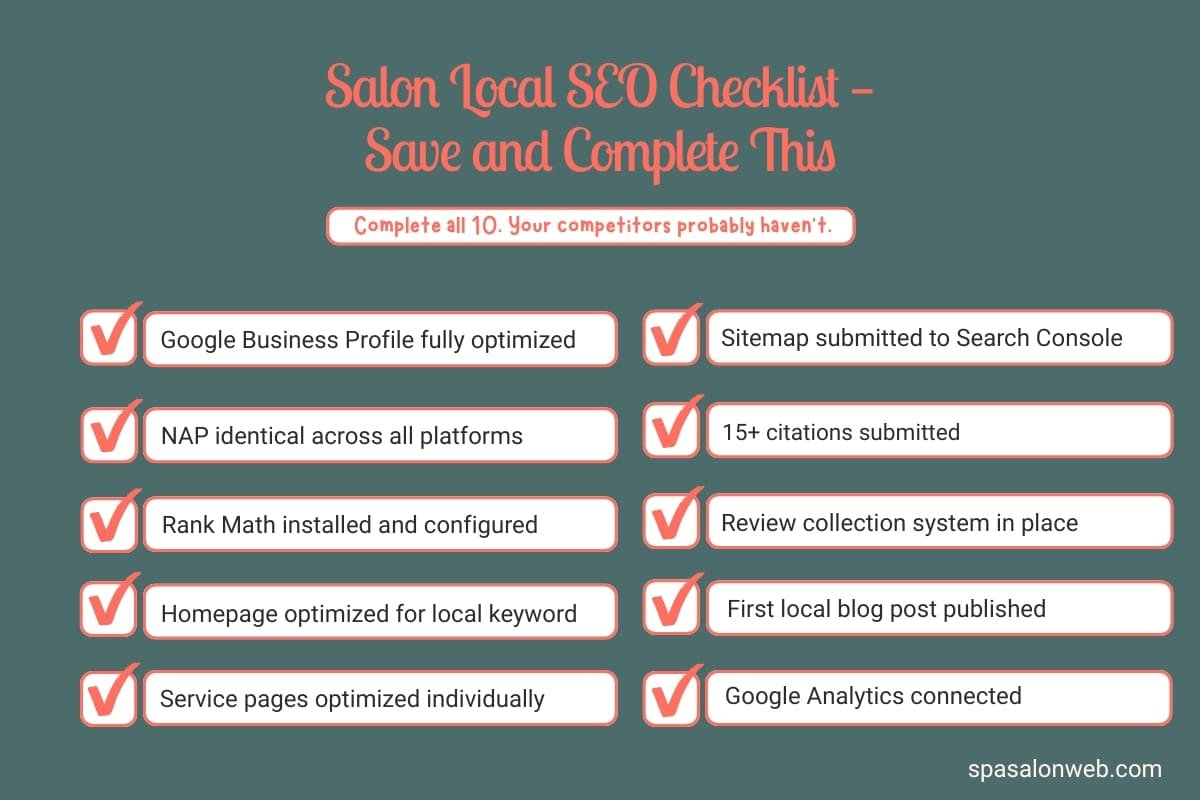
Local SEO Quick Reference Checklist
Save this and work through it over the next 30 days:
✓ Google Business Profile claimed and fully optimized
✓ NAP identical across website, Google, Facebook, Yelp, and all directories
✓ Rank Math installed — Local SEO module configured
✓ Homepage and service pages optimized for local keywords
✓ Sitemap submitted to Google Search Console
✓ 15+ local citations submitted across directories
✓ Google review request system in place (QR code + follow-up message)
✓ First location-focused blog post published
✓ Google Analytics connected and tracking
✓ Monthly maintenance routine scheduled
Ready to Build Your Local SEO Foundation?
Every step in this guide works better on a fast, well-structured WordPress website. If your salon website is slow, poorly organized, or missing key pages — local SEO will be harder and slower to deliver results.
Need a fast, SEO-ready foundation? Start with Hostinger — the hosting I use for every salon website I build. LiteSpeed servers, free SSL, one-click WordPress installation, and the speed performance that Google rewards. From $2.99/month with a free domain included. Read more about why I recommend it on my Hosting page.
Want your complete salon website built with local SEO already set up? Check my Fiverr packages — I’ll build your WordPress website, configure Rank Math for local SEO, set up your Google Business Profile, and hand over a site that’s ready to rank from day one.
Your future clients are searching for you on Google right now. Make sure they can find you.
Have a question about local SEO for your specific salon or city? Drop it in the comments — I reply to every one.
Frequently Asked Questions — how to get salon website on Google
Q1: How long does it take for my salon website to appear on Google?
A: It depends on which part of Google you’re targeting. Your Google Business Profile typically appears in Google Maps results within 2–4 weeks of full optimization. On-page SEO changes to your website take 4–8 weeks before ranking movement becomes visible in Google Search Console. Blog posts targeting local keywords take 3–6 months to rank consistently. Local SEO is not instant — but every step compounds over time. A salon that starts today and stays consistent will significantly outrank a competitor who waits another six months.
Q2: Do I need to pay for Google Ads to show up on Google?
A: No — everything in this guide is completely free. Google Business Profile, Rank Math SEO, Google Search Console, Google Analytics, and local citation directories all cost nothing. Organic local SEO — ranking naturally in Google Maps and search results without paying for ads — is the most cost-effective long-term marketing strategy available to salon owners. Paid Google Ads can complement your organic efforts but are never a replacement for a properly optimized local presence.
Q3: What is the most important local SEO step for a salon?
A: Setting up and fully optimizing your Google Business Profile is the single most impactful step. It’s what gets your salon into the Google Maps 3-pack — the three businesses shown at the very top of local search results. More potential clients see the Maps pack than any other part of Google search results. If you only do one thing from this guide today, make it Step 1 — claim your Google Business Profile and fill in every single field completely.
Q4: How many Google reviews does my salon need to rank well locally?
A: There’s no magic number, but in most local markets 30–50 genuine Google reviews at 4.5 stars or above puts you in a competitive position for local rankings. In less competitive areas, even 15–20 reviews can be enough to appear in the Maps 3-pack. The key is consistency — a salon collecting 3–5 new reviews every month will steadily outrank a competitor sitting at the same review count for years. Start asking every satisfied client today and make it a permanent part of your salon’s routine.
Q5: What is NAP and why does it matter for my salon's Google ranking?
A: NAP stands for Name, Address, and Phone number — the three pieces of information Google uses to verify your salon is a legitimate, established business. When your NAP is identical across your website, Google Business Profile, Facebook, Yelp, and local directories, Google gains confidence in your business data and ranks you higher in local results. When it’s inconsistent — different spellings, different phone formats, different address abbreviations — Google loses confidence and ranks you lower than competitors with cleaner data.
Q6: Can I do local SEO myself or do I need to hire someone?
A: Every step in this guide is something a non-technical salon owner can do themselves using free tools. Google Business Profile optimization, NAP consistency, Rank Math configuration, citation submission, and review collection all require time and attention — not technical skills. The realistic time investment is 3–4 hours to complete the initial setup across all 8 steps, plus about 15 minutes per month for ongoing maintenance. If you’d rather have a professional handle the complete setup from day one, that’s exactly the kind of work I do through my Fiverr packages.
Q7: Does my salon website's speed affect my Google rankings?
A: Yes — directly. Google uses Core Web Vitals (page speed metrics) as a ranking factor for local search results. A slow salon website ranks lower than a fast competitor even with identical content and reviews. This is why I recommend Hostinger with LiteSpeed servers as the hosting foundation for every salon website I build — the speed advantage starts at the server level before any optimization plugin is applied. If your salon website is currently slow, read my complete speed optimization guide before focusing on SEO — a fast website makes every SEO effort more effective.
Q8: Should I create separate pages for each salon service or put everything on one page?
A: Create separate pages for each main service — especially for services you want to rank for locally. A dedicated page for “balayage” optimized for “balayage in [your city]” will always outrank a single services page that mentions balayage in one paragraph among ten other services. Each service page is an independent ranking opportunity targeting its own local keyword. For a salon offering five main services, that’s five additional pages working for you in Google search — each one a potential entry point for a new client.