
A hair salon owner from New York messaged me on Fiverr last year. She had spent three months building her website on Wix — learning the editor, tweaking the design, and setting up her service menu. She was proud of it. Then she tried to add an online booking system that matched how her salon actually operated — multiple staff members, different services, different appointment durations, and automatic reminders.
That’s when she discovered the real challenge behind the Wix vs WordPress for salon websites debate. Wix was easy to start with, but as her business grew, she found herself running into limitations that made customization and scalability difficult.
Wix couldn’t do it. Not properly.
She came to me to migrate everything to WordPress. The migration took longer than building from scratch would have. She lost three months of work and paid twice.
I’m not telling this story to scare you off Wix. I’m telling it because I’ve seen it happen more times than I can count — and if you’re a salon owner choosing your website platform right now, this post might save you from making the same mistake.
Disclosure: This post recommends tools and services based on personal use and experience. If I join an affiliate program for any of these in the future, I’ll clearly mark those links as affiliate links.
The Short Answer — Wix vs WordPress for salon websites
If you need something live today with zero learning curve and you have a very simple salon setup — Wix works fine. But if you’re building a serious salon business, want to rank on Google, need a professional booking system, and want to own your website long-term — WordPress is the clear winner. It’s not even close.
Here’s the full breakdown so you can decide for yourself.
Quick Comparison: Wix vs WordPress for Salon Websites
Feature | Wix | WordPress + Hostinger |
|---|---|---|
Ease of use | ⭐⭐⭐⭐⭐ | ⭐⭐⭐ |
Design flexibility | ⭐⭐⭐ | ⭐⭐⭐⭐⭐ |
Booking system options | ⭐⭐⭐ | ⭐⭐⭐⭐⭐ |
SEO capability | ⭐⭐⭐ | ⭐⭐⭐⭐⭐ |
Long-term cost | ⭐⭐ | ⭐⭐⭐⭐⭐ |
Ownership & control | ⭐⭐ | ⭐⭐⭐⭐⭐ |
Scalability | ⭐⭐⭐ | ⭐⭐⭐⭐⭐ |
Let me explain each of these in detail.
What Is Wix?
Wix is an all-in-one website builder — hosting, design tools, and domain registration all under one roof. You pick a template, drag elements around, and publish. No separate hosting account needed. No technical setup. It’s genuinely the easiest way to get a website live quickly.
What Is WordPress?
WordPress is an open-source content management system that powers 43% of all websites on the internet — from small salon sites to major news publications. Unlike Wix, WordPress requires separate hosting. I personally use and recommend Hostinger for all salon websites I build — it’s fast, beginner-friendly, and starts at $2.99/month with a free domain included.
With WordPress you get complete ownership and control over every aspect of your website. That distinction matters more than most salon owners realize at the start.
Head-to-Head: 6 Categories That Matter for Salon Owners
1. Ease of Use
Winner: Wix — but the gap is smaller than you think
I’ll be straight with you — Wix is easier. You sign up, pick a template, and start editing immediately. There’s nothing to install, no hosting to configure, no plugins to think about. For someone who has never built a website before, Wix feels intuitive from day one.
WordPress has a learning curve. There’s a dashboard to navigate, a theme to install, plugins to set up. It takes more time to get started.
But here’s the thing — that gap has closed significantly. Hostinger’s one-click WordPress installation means the technical setup takes under two minutes. And Elementor’s visual drag-and-drop editor makes designing pages almost as intuitive as Wix. Most of my clients who had never used WordPress before were comfortable navigating it within a few days.
The ease-of-use advantage Wix has is real — but it’s not big enough to outweigh everything else on this list.
2. Design and Customization
Winner: WordPress — by a wide margin
Wix has hundreds of templates and they look good. The problem is you’re locked into the template you choose at the start. Want to switch to a different template later? You’ll have to rebuild your entire website from scratch — Wix doesn’t carry your content across templates.
WordPress with Elementor gives you unlimited design freedom. You can change your layout, switch themes, redesign individual pages, and create completely custom sections — all without rebuilding anything else. Your content stays exactly where it is.
For salon owners who care about brand identity — who want their website to feel as premium and unique as their salon space — WordPress is the only real choice. Wix templates start to look generic very quickly, especially when you realize other salons in your city are using the exact same one.
3. Booking System
Winner: WordPress — massively
This is where Wix falls apart for serious salon businesses.
Wix has a built-in booking tool called Wix Bookings. It works for very simple setups — one staff member, basic services, straightforward scheduling. But the moment you need anything more advanced, you hit a wall:
- Multiple staff members with different schedules? Limited.
- Automated SMS reminders? Only on higher-priced plans.
- Custom booking flows for different service types? Very restricted.
- Transaction fees on bookings? Yes — on lower plans.
WordPress has Amelia, LatePoint, and BookingPress — professional booking systems built specifically for beauty and wellness businesses. These plugins handle multiple staff members, complex service menus, automated email and SMS reminders, online payments, deposits, and custom booking rules — all without transaction fees.
After setting up booking systems for 300+ salon websites, I can tell you with confidence: the WordPress booking ecosystem is years ahead of what Wix offers. This single category is enough reason for most salon owners to choose WordPress.
4. SEO — Getting Found on Google
Winner: WordPress — clearly
Local SEO is everything for a salon. When someone in your city searches “hair salon near me” or “best massage in [city name]” — you want your website to appear. That happens through SEO, and your platform choice directly affects how well you can optimize your site.
WordPress with Rank Math SEO gives you deep, granular control over everything that matters for Google rankings:
- Custom meta titles and descriptions for every page
- Schema markup (tells Google exactly what your business is)
- XML sitemaps generated automatically
- Breadcrumb navigation
- Page speed optimization through LiteSpeed Cache
- Clean URL structure you control completely
Wix has improved its SEO tools significantly in recent years — and to be fair, it’s no longer as bad as it used to be. But it still has technical limitations that affect rankings. Wix pages tend to load slower on mobile. The URL structure is less clean. Code bloat from the Wix editor adds unnecessary weight to your pages.
For a local salon trying to rank on the first page of Google in a competitive city, these differences add up. WordPress gives you the SEO foundation that serious rankings require.
5. Cost Over Time
Winner: WordPress — significantly
This is the comparison most people don’t make when they first choose Wix — they look at the monthly price and think it’s affordable. But let’s look at what you actually pay over three years:
💰 Cost Comparison Over 3 Years — Wix:
Plan | Monthly | Annual | 3-Year Total |
|---|---|---|---|
Core (basic) | $17/month | $204/year | $612 |
Business (needed for bookings) | $35/month | | $1,260 |
Business Elite | $159/month | $1,908/year | $5,724 |
And remember — Wix Bookings on lower plans charges transaction fees on every appointment booked through your site.
💰 Cost Comparison Over 3 Years — WordPress + Hostinger:
Item | Cost |
|---|---|
Hostinger Premium (2-year term) | $2.99/month (~$72/year) |
Free domain (year 1) | $0 |
Domain renewal (year 2+) | ~$12/year |
Astra theme (free version) | $0 |
BookingPress (free version) | $0 |
Rank Math SEO (free) | $0 |
Total Year 1 | ~$72 |
Total Year 2 | ~$84 |
Total Year 3 | ~$84 |
3-Year Total | ~$240 |
The difference is stark. Over three years, a salon owner on Wix’s Business plan pays $1,260. The same salon owner on WordPress with Hostinger pays around $240 — for a more powerful, more flexible, more professional website.
That $1,000+ difference could fund professional photography, Google Ads, or a year of social media content creation for your salon.
6. Ownership and Control
Winner: WordPress — completely
This is the category most salon owners don’t think about until it’s too late.
With Wix, you are renting space on their platform. Your website lives on Wix’s servers, under Wix’s terms, subject to Wix’s pricing decisions. If Wix raises prices next year — and they already have, multiple times — you either pay or you lose your website. If Wix discontinues a feature you depend on, you have no recourse. If Wix ever shuts down — unlikely but not impossible — your website disappears with it.
With WordPress on Hostinger, you own your website completely. The files, the database, the content — all of it is yours. You can download a full backup and move your website to any other hosting provider in the world at any time. No permission needed. No data held hostage.
Your salon website is a business asset. It should be something you own — not something you rent.
Where Wix Actually Wins
I want to be fair here because Wix genuinely is the right choice in some situations:
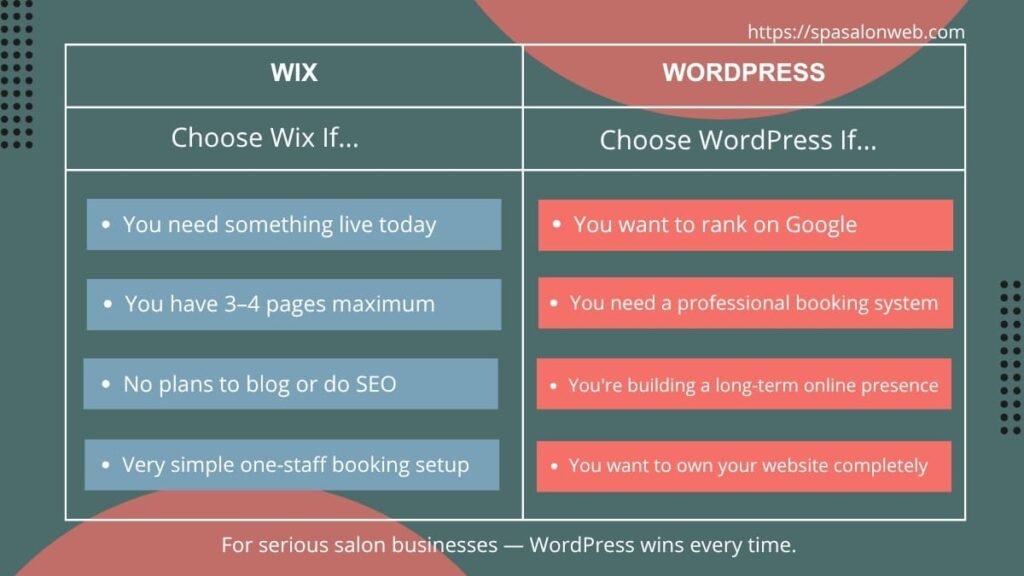
Wix is better when:
- You need something live today with absolutely zero setup time
- Your website is 3–4 pages maximum and will never need to grow
- You have no plans to blog or invest in SEO
- You have a very simple booking setup — one staff member, basic services
- You want customer support you can call or chat with easily
- You’re testing a business idea and not ready to commit to a long-term platform
If any of those describe your situation honestly — Wix is a perfectly reasonable choice for now.
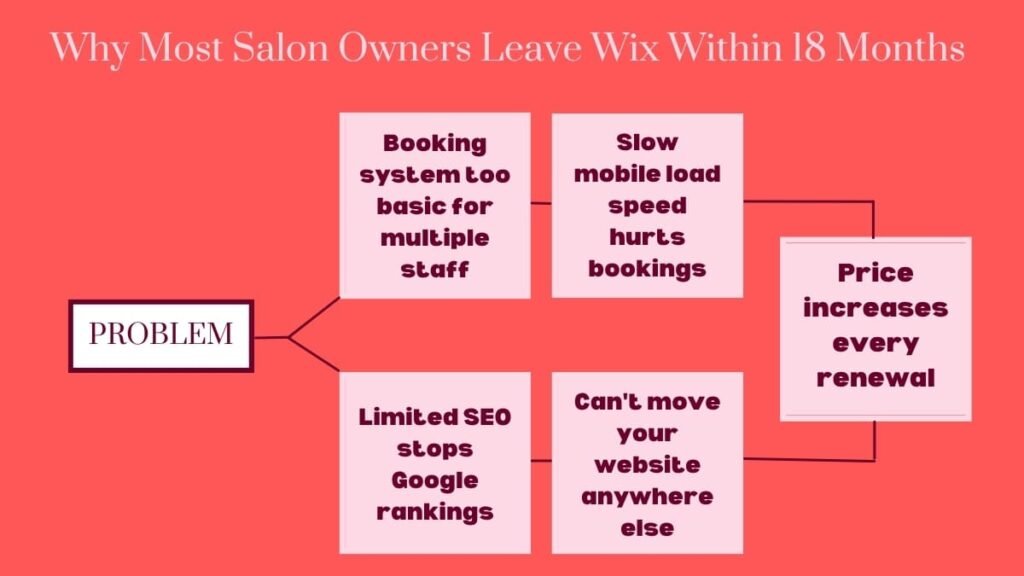
But in my experience, most salon owners outgrow Wix within 12–18 months. They want to add a blog. They want better SEO. They want a more capable booking system. They want to add team members. And then they face the same situation as my New York client — rebuilding everything from scratch on a new platform, having wasted months of work.
A Real Client Story
One of my clients — a beauty salon owner from London — came to me after 14 months on Wix. Her specific frustrations: her booking page loaded slowly on mobile (she could see visitors dropping off in her analytics), she couldn’t get her salon to rank for local search terms despite trying for over a year, and her Wix Business plan had just renewed at a higher price than she originally signed up for.
We migrated her to WordPress on Hostinger. Within 60 days of the migration, her Google rankings improved noticeably for three of her target local keywords. Her booking page load time dropped significantly. And her annual website cost went from $420 to under $100.
She told me she wished she had started on WordPress from day one. I hear that a lot.
My Honest Recommendation
After 8+ years and 300+ salon websites, if a salon owner asked me today which platform to use — my answer is WordPress every single time.
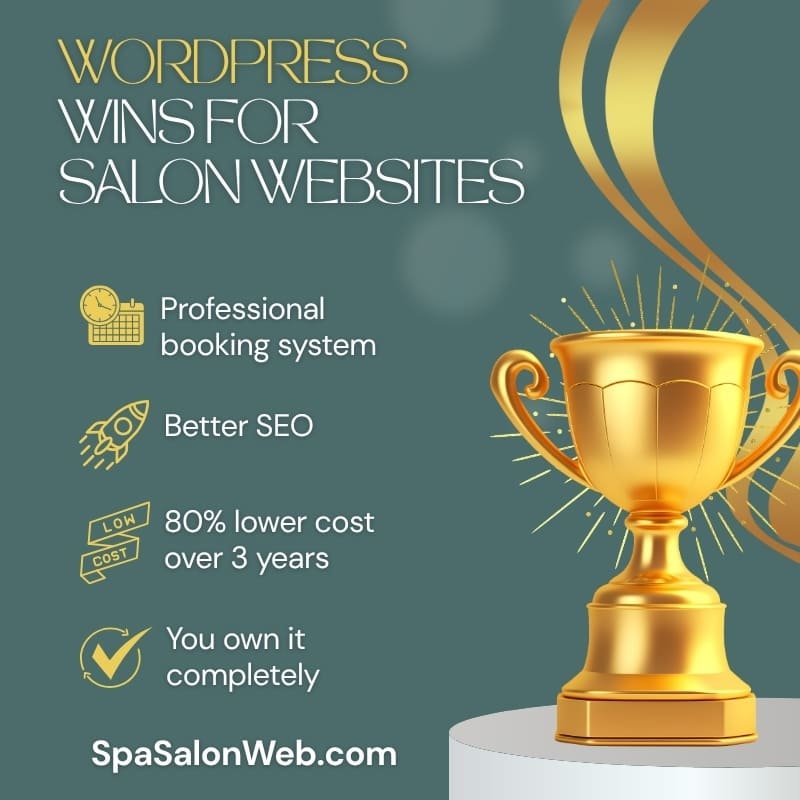
Not because Wix is terrible. It isn’t. But because salon owners who are serious about growing their business online need SEO capability, a professional booking system, full ownership, and long-term cost efficiency. WordPress delivers all four. Wix doesn’t — at least not at the same level.
Here’s how I break it down simply:
Choose Wix if: You need something live today, you have a very simple setup, and you’re not yet focused on Google rankings or advanced bookings.
Choose WordPress if: You’re building a real online presence for your salon, you want to rank on Google, you need a professional booking system, and you want to own your website as a long-term business asset.
If you’re ready to build on WordPress, Hostinger is where I’d start — it’s the hosting I use for every salon site I build. Their Premium plan includes a free domain, free SSL, one-click WordPress installation, and LiteSpeed servers that keep your site loading fast on mobile. You can read more about why I recommend them on my Hosting page.
For a full step-by-step walkthrough of setting up your WordPress salon website on Hostinger, I’ve written a complete beginner’s tutorial — read it here.
And if you want to know exactly how much a WordPress salon website costs to build, check my full cost breakdown here.
Ready to Get Started?
Want to build it yourself on WordPress? Grab your Hostinger plan here — start with the Premium plan and you’ll have everything you need in one place for under $3/month.
Rather have a professional handle it? Check my Fiverr packages — I’ll build your complete salon website on WordPress, including the booking system, speed optimization, and mobile design. You focus on your clients, I’ll handle your website.
Whichever platform you choose — the most important thing is that you start. Your future clients are searching for you right now. Make sure they can find you.
Have a question about Wix vs WordPress for your specific salon setup? Drop it in the comments below — I reply to every one.
Frequently Asked Questions — Wix vs WordPress for salon websites!
Q1: Is Wix or WordPress better for a small salon with just one staff member?
A: For a single-staff salon with basic needs, Wix can work fine in the short term. But even as a solo stylist or therapist, WordPress on Hostinger gives you better SEO, lower long-term costs, and a more professional booking system — all starting at $2.99/month. Most solo salon owners who start on Wix end up switching to WordPress within a year anyway. Starting on WordPress from day one saves you that painful migration later.
Q2: Can I switch from Wix to WordPress later if I change my mind?
A: Yes — but it’s not simple. Wix doesn’t export your content cleanly to WordPress, which means migrating usually involves rebuilding your pages from scratch rather than importing them. Your blog posts can be exported but formatting rarely carries over perfectly. If you’re already on Wix and thinking about switching, the sooner you do it the better — the longer you wait, the more content you’ll have to rebuild. I handle Wix to WordPress migrations regularly through my Fiverr packages.
Q3: Is WordPress too complicated for a non-technical salon owner?
A: It used to be more intimidating than it is today. With Hostinger’s one-click WordPress installation and Elementor’s visual drag-and-drop editor, most non-technical salon owners get comfortable with WordPress within a few days. The learning curve is real but it’s not steep — and once you know it, you have full control over your website forever. Wix feels easier on day one, but WordPress feels more empowering by week two.
Q4: Does Wix charge transaction fees on salon bookings?
A: Yes — on Wix’s lower-tier plans, Wix Bookings charges a transaction fee on every appointment booked through your website. To remove transaction fees you need their Business plan at $35/month. WordPress booking plugins like BookingPress, Amelia, and LatePoint charge zero transaction fees regardless of which plan you’re on. Over a year of bookings, this difference adds up to real money.
Q5: Which platform is better for ranking my salon on Google?
A: WordPress wins clearly for local SEO. With Rank Math SEO installed, you get full control over meta titles, descriptions, schema markup, sitemaps, and page speed — all of which directly affect your Google rankings. Wix has improved its SEO tools but still has technical limitations including slower mobile load times and less clean URL structures. For a salon trying to rank for “hair salon in [your city]” — WordPress gives you a significantly stronger foundation.
Q6: What does a WordPress salon website actually cost compared to Wix?
A: Over three years, a WordPress salon website on Hostinger costs around $240 total. The equivalent Wix Business plan — which you need for proper booking features — costs $1,260 over the same period. That’s a $1,000+ difference for a more powerful, more flexible website that you fully own. I break down the full cost comparison in detail in my Salon Website Cost post.
Q7: Can I use my own domain name with both Wix and WordPress?
A: Yes — both platforms support custom domain names. With Wix, connecting a custom domain requires a paid plan starting at $17/month. With Hostinger’s Premium WordPress plan, a free domain is included for the first year and connecting it is automatic. After the first year, domain renewal costs around $10–15/year on both platforms.
Q8: Which platform do professional salon website designers recommend?
A: Almost universally, WordPress. Every professional web developer I know — including myself after 300+ salon website projects — builds on WordPress. It’s the platform that gives you the most control, the best SEO tools, the most capable booking systems, and the lowest long-term cost. Wix is designed for people who want to build their own website quickly without professional help. WordPress is designed to grow with your business for the long term.