

A spa owner from California messaged me before starting her website project: “Dony, I’ve seen Hostinger and Bluehost both recommended everywhere. Which one should I actually use for my salon website?”
It’s one of the most common questions I get. And I understand the confusion — both hosts are everywhere online, both look similar on the surface, and both promise fast WordPress hosting at affordable prices.
That’s exactly why I decided to create this Hostinger vs Bluehost for Salon Websites comparison. After personally using both and building 300+ salon websites for clients across the US, UK, Canada, and Australia, I have a clear answer. Let me break it down honestly so you can make the right decision for your salon in 2026.
Affiliate Disclosure: This post contains affiliate links. If you sign up through my link, I earn a small commission at no extra cost to you. I only recommend tools I personally use and trust.
The Short Answer — Hostinger vs Bluehost for Salon Websites
Both Hostinger and Bluehost are solid WordPress hosts. Neither one will break your website. But for most salon owners — especially those watching their budget and wanting the best performance for their booking pages — Hostinger wins. Better storage, faster servers, and significantly lower renewal pricing. Bluehost has its strengths and I’ll cover those fairly. But when I’m recommending hosting to a salon owner, my answer is Hostinger every time.
Here’s exactly why.
Quick Comparison: Hostinger vs Bluehost
Feature | Hostinger | Bluehost |
|---|---|---|
Starting price | $2.99/month | $2.95/month |
Renewal price | $7.99/month | $10.99/month |
Free domain | ✅ Year 1 | ✅ Year 1 |
Free SSL | ✅ | ✅ |
Storage | 100GB NVMe | 10GB SSD |
WordPress install | One-click | One-click |
Server technology | LiteSpeed | Apache |
Free email hosting | ✅ | ❌ |
Uptime guarantee | 99.9% | 99.9% |
24/7 support | ✅ Live chat | ✅ Live chat |
Money-back guarantee | 30 days | 30 days |
Best for | Value + performance | WordPress beginners |
The introductory prices look almost identical. The real differences show up when you dig deeper — and especially when you look at renewal pricing.
What Is Hostinger?
Hostinger was founded in 2004 and now hosts over 3 million websites worldwide. They’re known for affordable pricing, fast LiteSpeed servers, and a clean control panel called hPanel that makes managing your website straightforward even for beginners.
I personally host SpaSalonWeb.com on Hostinger and recommend it to every salon owner I work with. It’s the hosting I’ve settled on after testing multiple providers across hundreds of client projects. You can read more about why on my Hosting page.
This post contains affiliate links. If you sign up through my Hostinger link, I earn a small commission at no extra cost to you.
What Is Bluehost?
Bluehost is one of the oldest and most recognized hosting providers in the industry — founded in 2003 and officially recommended by WordPress.org. They’re widely used by beginners and small business owners, and their name recognition is hard to argue with. Bluehost is owned by Endurance International Group, which also owns several other major hosting brands.
They’re a legitimate, reliable hosting provider. I want to be clear about that before the comparison — this isn’t a case of a good host vs a bad one. It’s a case of which one delivers better value specifically for salon website owners.
Head-to-Head: 7 Categories That Matter for Salon Owners
1. Pricing — First Year vs Renewal
This is the most important category for salon owners on a budget — and the one where most people get surprised after signing up.
Both hosts advertise attractive introductory prices. But introductory prices only last for your first billing term. The renewal price is what you pay every year after that — and that’s where the real difference lives.
Hostinger Premium WordPress Hosting:
- Introductory: $2.99/month (on a 2-year term)
- Renewal: $7.99/month
Bluehost Basic WordPress Hosting:
- Introductory: $2.95/month (on a 1-year term)
- Renewal: $10.99/month
Here’s what that looks like over 3 years with real numbers:
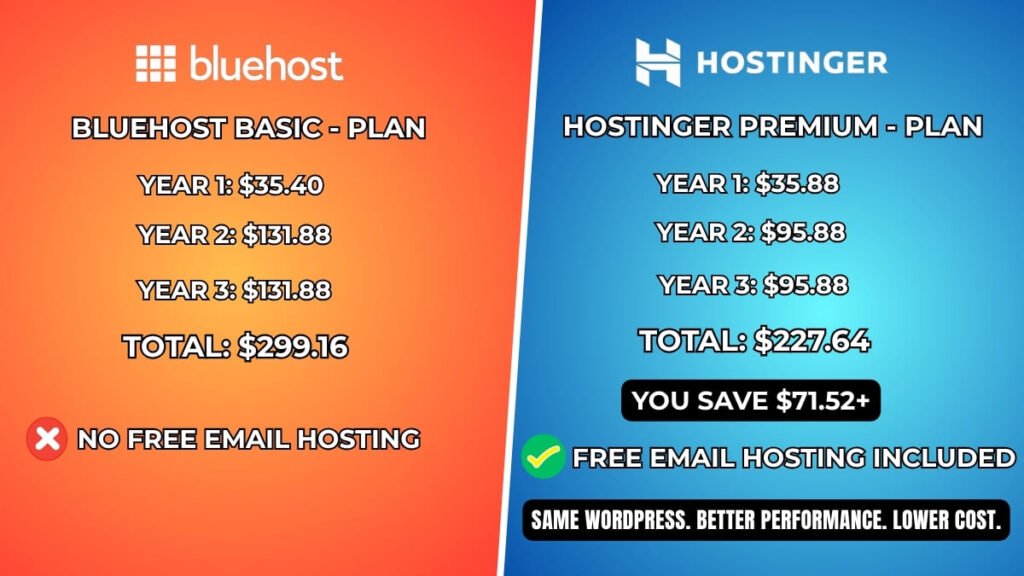
Years of Term | Hostinger Premium | Bluehost Basic |
|---|---|---|
Year 1 | $35.88 | $35.40 |
Year 2 | $95.88 | $131.88 |
Year 3 | $95.88 | $131.88 |
3-Year Total | $227.64 | $299.16 |
Over 3 years you save over $70 with Hostinger — and that’s before factoring in that Hostinger includes free email hosting while Bluehost charges extra for it on their basic plan.
For a salon owner reinvesting every dollar back into their business, that difference matters.
Winner: Hostinger
2. Performance and Speed
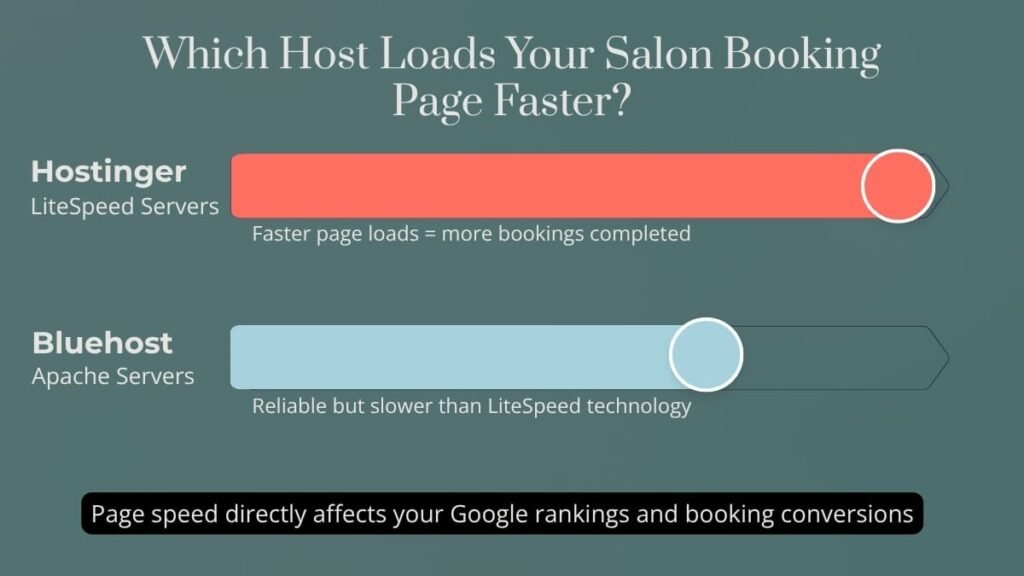
Page speed directly affects your salon business. A slow booking page frustrates visitors and costs you appointments. Google also uses page speed as a ranking factor — a faster website ranks higher in local search results.
Hostinger runs on LiteSpeed servers — the fastest web server technology available for WordPress hosting. LiteSpeed processes WordPress requests significantly faster than traditional Apache servers, especially under traffic load. Hostinger also offers a free LiteSpeed Cache plugin that works natively with their servers to squeeze every last bit of performance out of your website.
Bluehost runs on Apache servers. Apache is reliable and battle-tested — it powers a huge percentage of the web. But it’s slower than LiteSpeed for WordPress specifically. Bluehost has made performance improvements over the years, but the server technology gap is real.
In practice, both hosts will give you a fast enough website for a standard salon site. But Hostinger gives you a performance ceiling that Bluehost simply can’t match at the same price point.
Winner: Hostinger
3. Ease of Use
I’ll be honest here — Bluehost has a slight edge for absolute beginners.
When you sign up with Bluehost, their onboarding wizard walks you through every step of setting up WordPress — from choosing your site name to installing plugins. It feels more hand-holding and less intimidating for someone who has genuinely never touched a website before.
Hostinger’s hPanel is clean, well-designed, and intuitive — but it assumes a slightly higher comfort level from day one. The WordPress installer is straightforward, but there’s less guided onboarding than Bluehost offers.
That said — the difference is small. Most salon owners who have never used either platform find Hostinger’s hPanel easy to navigate within the first few minutes. It’s not a steep learning curve by any measure.
If you’re someone who gets anxious about new technology and wants maximum hand-holding — Bluehost’s onboarding might feel more reassuring on day one. For everyone else, Hostinger is just as easy to use.
Winner: Bluehost (slight edge)
4. Storage
This category isn’t even close — and it matters more than most salon owners realize at the start.
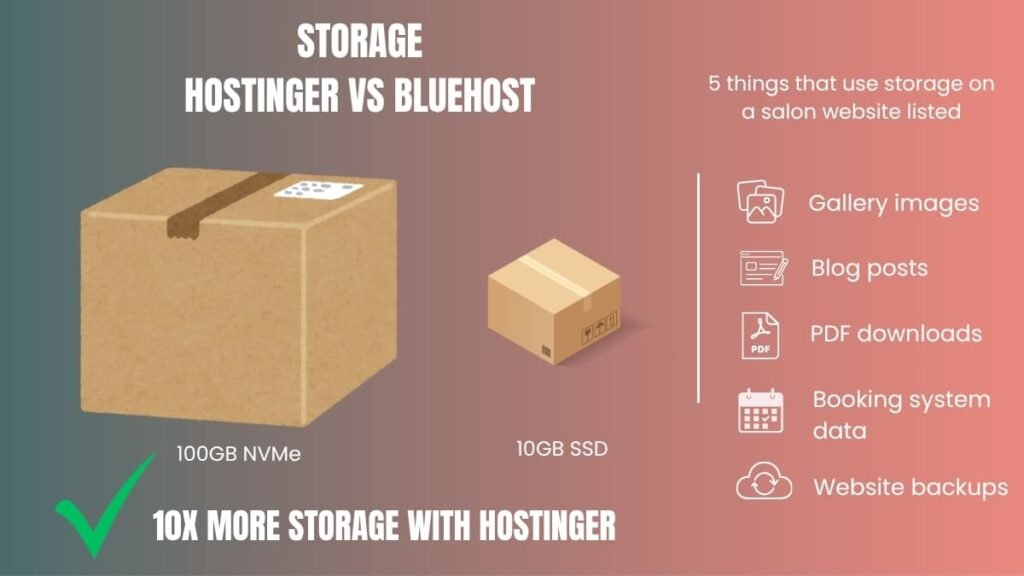
Hostinger Premium: 100GB NVMe storage Bluehost Basic: 10GB SSD storage
That’s a 10x difference in storage.
A fresh salon website doesn’t use much storage. But think about what you’ll add over the next 2–3 years: gallery images of your work, staff photos, blog post images, PDF downloads like checklists and guides, booking system data, plugin files, and regular backups. It adds up faster than you’d expect.
Salon owners who run photo-heavy websites — before and after galleries, portfolio sections, team photos — will feel the 10GB limit on Bluehost within 12–18 months. Then you either delete content or upgrade to a more expensive plan.
With Hostinger’s 100GB you have room to grow for years without thinking about storage limits.
Winner: Hostinger — clearly
5. WordPress Integration
Both hosts offer one-click WordPress installation and both handle WordPress well day-to-day. There’s no meaningful difference in how WordPress runs on either platform for a standard salon website.
Bluehost carries the “officially recommended by WordPress.org” badge — which sounds like a significant advantage. In practice, it means WordPress.org has verified that Bluehost meets their baseline hosting requirements. It’s a trust signal, not a performance guarantee. Plenty of hosts that aren’t on that recommended list outperform Bluehost in real-world testing.
I’d call this category a tie with a small nod to Bluehost for the official badge — which matters for peace of mind even if it doesn’t affect actual website performance.
Winner: Tie (slight Bluehost edge on trust signal)
6. Customer Support
Both hosts offer 24/7 live chat support — which is what most salon owners will use when they hit a problem.
From my personal experience and client feedback over the years: Hostinger’s support is consistently fast and helpful. Most issues I’ve submitted get resolved within a few minutes of starting a chat. The support agents are knowledgeable about WordPress specifically, which matters when you’re troubleshooting a booking plugin or speed issue.
Bluehost’s support has received more mixed reviews over the years. Wait times can stretch longer during peak hours, and the quality of support varies more noticeably between agents. To be fair — many Bluehost customers report perfectly fine support experiences. It’s not bad, it’s just less consistently excellent than Hostinger’s.
For a salon owner who rarely needs support, this difference won’t matter much. For someone who anticipates needing help during setup, Hostinger’s support track record is stronger.
Winner: Hostinger (slight edge)
7. Value for Money
When you add everything up — storage, speed, pricing, free email hosting, and support quality — Hostinger delivers more value per dollar than Bluehost at every comparable price point.
More storage. Faster servers. Lower renewal pricing. Free email hosting included. A clean control panel. And performance that scales well as your salon website grows.
For a salon owner who wants professional hosting without overpaying — this is the clearest win in the entire comparison.
Winner: Hostinger — clearly
Where Bluehost Actually Wins
I want to give Bluehost genuine credit where it deserves it — because it does deserve it in some areas:
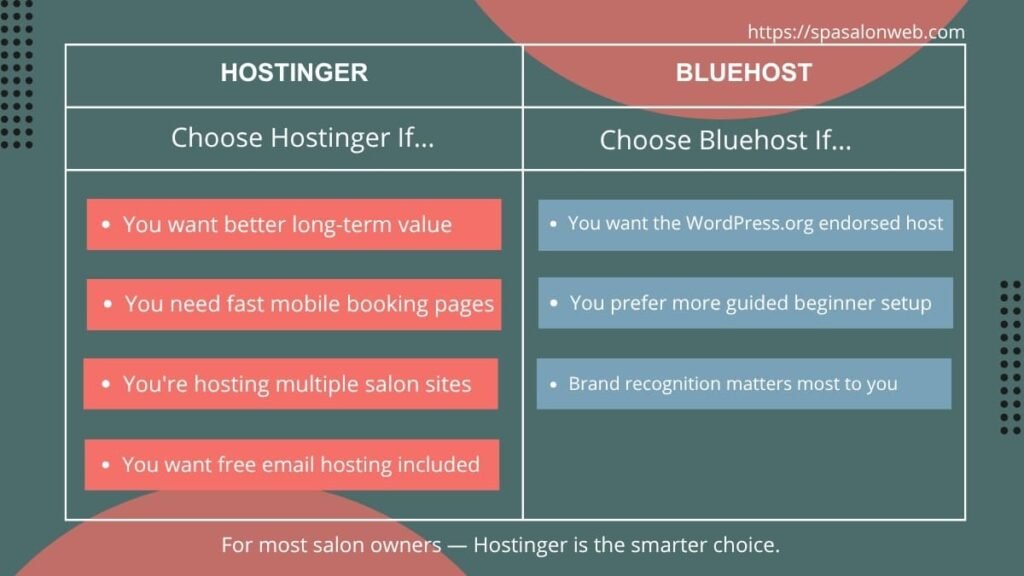
The WordPress.org official recommendation is a real trust signal. For a salon owner who is nervous about choosing a host and wants the most “official” option — Bluehost’s endorsement from WordPress.org is genuinely reassuring.
Beginner onboarding is smoother on Bluehost. Their setup wizard is more guided and step-by-step than Hostinger’s, which makes the first 30 minutes less intimidating for complete beginners.
Brand recognition matters to some people. Bluehost has been around since 2003 and is one of the most recognized names in hosting. Some salon owners feel more comfortable choosing a brand they’ve heard of repeatedly.
Extensive tutorial library. Because Bluehost is so widely used, there’s an enormous amount of tutorials, YouTube videos, and help articles specifically about Bluehost’s interface. Finding answers to specific questions is easy.
If brand recognition and the WordPress.org endorsement matter more to you than price and performance — Bluehost is a perfectly solid choice. You won’t regret it. But for most salon owners, the extra cost over time doesn’t deliver enough extra value to justify it.
A Real Hosting Decision Story
A nail salon owner from Toronto came to me ready to start her website project. She had already done her research and was leaning toward Bluehost because she had seen it recommended on a popular blogging website. When I asked her why specifically, she said: “It just sounds more trustworthy.”
I walked her through the actual comparison — the renewal pricing difference, the storage gap, the server speed difference for her booking page. Once she saw the numbers side by side, the decision was easy. She went with Hostinger, her website has been running smoothly for over a year, and her monthly cost at renewal was exactly what I told her it would be — no surprises.
That’s the conversation I try to have with every client before they commit to a hosting provider.
Which One Is Right for Your Salon?
Here’s my honest scenario-based recommendation:
You’re a budget-conscious salon owner starting your first website → Hostinger. Better value, more storage, faster servers. Start with the Premium plan.
You’re a complete beginner who wants maximum hand-holding during setup → Either works. Bluehost’s onboarding is slightly more guided, but Hostinger is not difficult. If price matters, still go Hostinger.
You’re prioritizing page speed for your booking page → Hostinger. LiteSpeed servers are genuinely faster than Apache for WordPress.
You manage multiple salon locations and need to host multiple websites → Hostinger. Their Premium plan hosts up to 100 websites. Bluehost Basic only hosts one.
You’ve already heard of Bluehost and feel confident with it → Either works for a basic salon website. But know that Hostinger will cost you less at renewal and give you more storage. The WordPress.org badge doesn’t change day-to-day performance.
You want a professional to build and set up everything for you → I personally use Hostinger for all client projects. Check my Fiverr packages — your hosting, WordPress setup, theme, booking system, and full website handled professionally.
My Final Verdict
After 8+ years building salon websites and testing hosting providers across hundreds of real client projects — Hostinger is my clear recommendation for salon owners in 2026.
It’s faster. It’s more affordable long-term. It gives you 10x more storage. It includes free email hosting. And it performs better under real-world conditions for WordPress salon websites specifically.
Bluehost is not a bad host — it’s a perfectly legitimate choice and millions of websites run on it without problems. But when a salon owner asks me which host to use, I recommend Hostinger every time. Not because of an affiliate commission — but because after building 300+ salon sites, it’s the host that consistently delivers the best results for my clients.
Ready to get started?
Get your Hostinger plan here → — start with the Premium WordPress Hosting plan. It includes your free domain, free SSL, one-click WordPress installation, and 100GB of storage. Everything your salon website needs in one place.
Need a complete step-by-step guide to setting up WordPress on Hostinger? I’ve written a full beginner’s tutorial — read it here.
Want to compare your total website costs before committing? Check my full salon website cost breakdown here.
Rather have a professional handle everything? Check my Fiverr packages here → — I’ll handle your hosting setup, WordPress installation, theme, booking system, and complete website design. You focus on your clients. I’ll handle your website.
Have a question about Hostinger vs Bluehost for your specific salon situation? Drop it in the comments below — I reply to every one.
Frequently Asked Questions — Hostinger vs Bluehost for Salon Websites
Q1: Is Hostinger or Bluehost better for a salon website in 2026?
A: For most salon owners, Hostinger is the better choice in 2026. It offers faster LiteSpeed servers, 10x more storage (100GB vs 10GB), lower renewal pricing, and free email hosting included — all of which matter for a growing salon website. Bluehost is a reliable alternative with a strong beginner onboarding experience and the WordPress.org official recommendation, but it costs more over time for comparable or lesser performance.
Q2: Is Hostinger reliable enough for a professional salon website?
A: Yes — and I say that from direct experience, not just research. I personally host SpaSalonWeb.com on Hostinger and have recommended it to clients across 300+ salon website projects. Their uptime consistently stays above 99.9%, their LiteSpeed servers load booking pages fast on mobile, and their support team resolves issues quickly. For a small to medium salon website, Hostinger is more than reliable enough.
Q3: Why is Bluehost officially recommended by WordPress.org if Hostinger is better?
A: WordPress.org’s recommended hosts list means those hosts meet WordPress’s baseline technical requirements — it’s a verification of compatibility, not a performance ranking. Many hosting providers that aren’t on that list outperform Bluehost in real-world speed tests. The badge is a useful trust signal for beginners, but it doesn’t guarantee better performance, better value, or better support than unlisted alternatives like Hostinger.
Q4: What happens to my Hostinger price when my plan renews?
A: Your introductory price only applies to your first billing term. After that, Hostinger renews at the regular rate — currently $7.99/month for the Premium plan. This is completely normal across all hosting providers. The key is that even at renewal, Hostinger’s pricing is lower than Bluehost’s renewal rate of $10.99/month. Always check renewal pricing before signing up with any host — not just the introductory offer.
Q5: Does Bluehost include free email hosting for my salon?
A: Not on their Basic plan. Bluehost’s entry-level plan does not include professional email hosting — you’d need to use Google Workspace or another email provider separately, which adds to your cost. Hostinger’s Premium plan includes free business email hosting, so you can create an address like contact@yoursalon.com without paying extra. For a salon owner who wants a professional email address, this is a meaningful difference.
Q6: Which host is better for my salon's online booking page speed?
A: Hostinger. Their LiteSpeed server technology processes WordPress requests significantly faster than Bluehost’s Apache servers — especially important for booking pages where a slow load time directly costs you appointments. Paired with the free LiteSpeed Cache plugin, Hostinger consistently delivers faster page load times for WordPress salon websites. A faster booking page means fewer visitors leaving before they complete their appointment request.
Q7: Can I move my salon website from Bluehost to Hostinger later?
A: Yes — migrating from Bluehost to Hostinger is straightforward. Hostinger offers a free website migration service for new customers, and their support team handles the technical side. Your website files, database, and content all transfer across cleanly. If you’re currently on Bluehost and unhappy with the renewal pricing or performance, switching to Hostinger is a realistic option without starting your website from scratch.
Q8: Do I need technical skills to set up WordPress on either host?
A: No — both Hostinger and Bluehost offer one-click WordPress installation that requires zero technical knowledge. You click install, fill in your site name and login details, and WordPress is ready within minutes. The main difference is that Bluehost’s onboarding wizard is slightly more guided for complete beginners, while Hostinger’s hPanel is clean and intuitive but slightly less hand-holding. Either way, no coding or technical experience is needed to get started.