
Last week, a nail salon owner from Texas messaged me on Fiverr: “Dony, I need a website. How much is it going to cost me?”
I told her the same thing I tell every salon owner who asks me that question — there’s no single number, but I can break it down so clearly that by the end of this post, you’ll know exactly what you’ll pay and why. No vague estimates. No surprises.
Wondering how much does a salon website cost in 2026? After 10+ years and 300+ salon, spa, and beauty business websites, I’ve seen every price range — from a $50 DIY setup to a $12,000 agency invoice. Let me save you from making the wrong choice for your budget.
Disclosure: This post recommends tools and services based on personal use and experience. If I join an affiliate program for any of these in the future, I’ll clearly mark those links as affiliate links.
The Short Answer: Salon Website Cost at a Glance
Here’s a quick overview before we dive into the details:
Website Type | Who It's For | Estimated Cost |
|---|---|---|
DIY (Wix/Squarespace) | Complete beginners | $0 – $300/year |
WordPress DIY | Tech-comfortable owners | $50 – $300/year |
Freelancer (like me) | Owners who want it done right | $300 – $1,500 one-time |
Agency | Large chains, multi-location | $2,000 – $10,000+ |
Keep reading — I’ll break down every option so you know exactly what you’re getting for your money.
What Actually Affects the Cost of a Salon Website?
Before we talk numbers, you need to understand what you’re actually paying for. A website isn’t one thing — it’s a collection of services and tools that each have their own cost.
Here’s what makes up the real price:
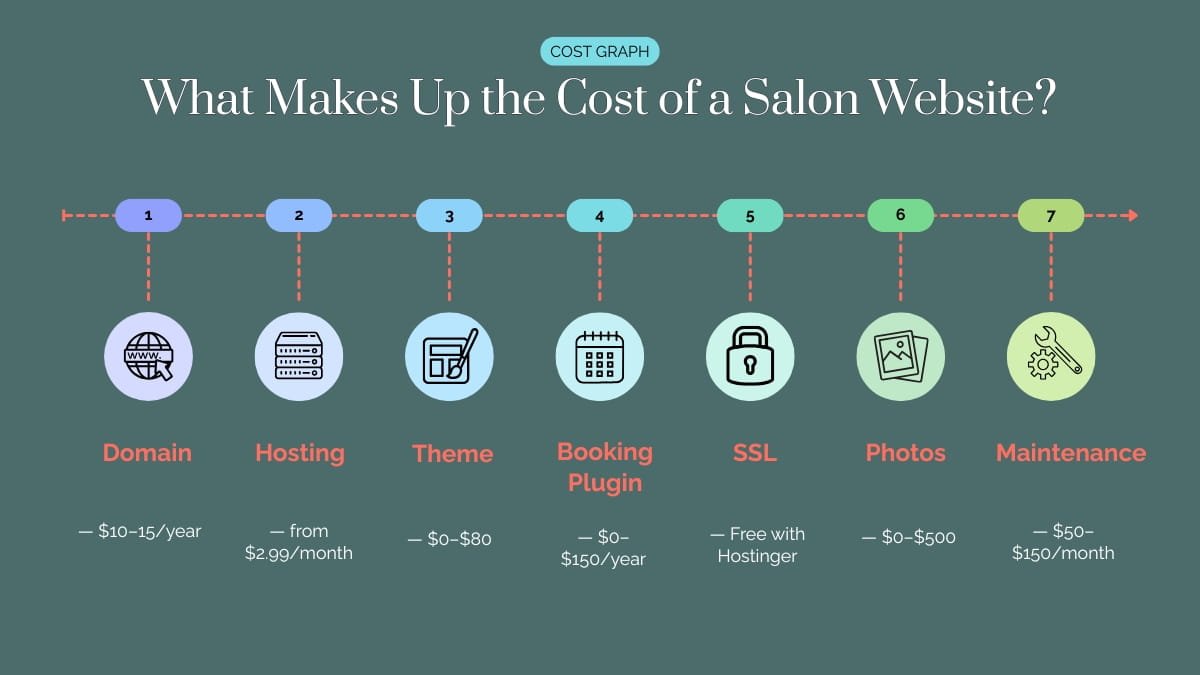
1. Domain Name Your web address (like yoursalonname.com). This costs around $10–15/year. Most hosting providers, including Hostinger, include a free domain for the first year with their plans — so you can knock this cost down to zero at the start.
2. Web Hosting This is the service that keeps your website live on the internet 24/7. Pricing ranges from $2.99/month to $15+/month depending on the provider and plan. I personally recommend Hostinger for salon owners — their Premium plan starts at $2.99/month and includes a free domain, free SSL, and LiteSpeed servers that load your booking page fast on mobile. You can read more about why I recommend them on my Hosting page.
3. WordPress Theme Your website’s visual design template. Free themes exist and work well for simple sites. Premium themes like Astra or Kadence cost $50–$80 one-time and give you much more design flexibility and speed. I use both regularly on client projects — they’re listed on my Recommended Tools page.
4. Plugins WordPress plugins add functionality — booking systems, SEO, security, backup, speed optimization. Some are free, some cost $50–$200/year. The booking plugin alone (like Amelia or LatePoint) is often the biggest plugin cost for salon websites.
5. Design and Development This is where the biggest cost difference comes in. DIY costs you time. A freelancer costs money but saves you weeks of frustration. An agency costs the most but may be unnecessary for a single-location salon.
6. Content — Photos and Copywriting Professional photos make a massive difference to how your salon website looks and converts visitors into bookings. Stock photos are free but generic. A local photographer can cost $200–$500 for a session. Copywriting (someone writing your page content) adds another $100–$500 if you hire it out.
7. Ongoing Maintenance Websites need updates — WordPress core, themes, plugins, security patches. If you do it yourself, it costs time. If you hire someone, expect $50–$150/month for basic maintenance.
Option 1 — DIY with WordPress + Hostinger (Most Budget-Friendly)
If you’re comfortable learning the basics and want to keep costs low, building your own WordPress website on Hostinger is the most affordable route.
Here’s a realistic cost breakdown for this option:
Item | Cost |
|---|---|
Hostinger Premium Plan (2-year term) | $2.99/month (~$72 total) |
Free domain (included with Hostinger) | $0 first year |
Free SSL (included with Hostinger) | $0 |
Astra or Kadence theme | $0 (free version) or $59 one-time |
Elementor page builder | $0 (free version works well) |
Booking plugin (BookingPress free or Amelia) | $0 – $79/year |
Rank Math SEO plugin | $0 (free version) |
Total Year 1 | ~$72 – $210 |
This is genuinely the cheapest way to get a professional salon website live. Hostinger’s one-click WordPress installation means you don’t need to be a developer — just follow their setup wizard.
The catch? It takes time to learn. Expect 2–4 weeks of trial and error if you’ve never built a WordPress site before. If you’d rather spend those weeks on your clients, keep reading.
Option 2 — Hiring a Freelancer (Best Value for Most Salon Owners)
This is the option I’d recommend to 80% of salon owners I talk to.
Hiring a skilled WordPress freelancer means you get a professionally designed, mobile-optimized, fast-loading website — without spending months learning how to build one yourself. You describe what you want, they build it, you get back to running your salon.
Here’s what a typical freelancer project includes:
- Custom WordPress design (built on a premium theme)
- Mobile-optimized layout
- Online booking system setup (Amelia, LatePoint, or BookingPress)
- Contact form and Google Maps integration
- Basic on-page SEO setup
- Speed optimization
- Training so you can manage it yourself after handoff
Realistic price range: $300 – $1,500 one-time
The price varies depending on the number of pages, complexity of the booking system, and the freelancer’s experience. On Fiverr, you can find everything from $50 gigs (basic, template-based) to $1,500+ (custom, full-featured builds).
I personally deliver complete salon website projects through Fiverr — you can check my packages here. Every project includes the booking system setup, speed optimization, and full handoff training. My clients don’t just get a website — they get a website they can actually use and manage.
Why is this better than an agency for most salons?
Simple. You’re paying for results, not overhead. Agencies have account managers, project coordinators, designers, developers, and a big office. That’s all baked into their price. A skilled freelancer delivers the same quality website for a fraction of the cost.
Option 3 — Hiring an Agency (When It Makes Sense)
Agencies are not wrong — they’re just not right for most single-location salon owners.
If you’re running a multi-location chain, need custom booking integrations with your POS system, require ongoing retainer support, or have a marketing budget to match, an agency can be a good investment.
Realistic price range: $2,000 – $10,000+ one-time, plus monthly retainers
For a solo salon owner or small beauty business, this is almost always overkill. The $5,000 you spend on an agency website could fund two years of Hostinger hosting, a premium booking system, professional photography, and a year of social media ads — with money left over.
My honest advice: unless you’re a chain with multiple locations or have a very large budget, skip the agency route.
Hidden Costs Salon Owners Often Miss
This is the section most website cost articles skip — and it’s where a lot of salon owners get surprised after launch.
Booking Plugin Annual Renewal Amelia costs around $79/year after the first year. LatePoint is similar. BookingPress has a free version but premium features cost extra. Budget for this ongoing cost from the start.
Professional Photos This one surprises people. A WordPress website with bad photos looks bad — no matter how good the design is. If you don’t have professional photos of your salon, your staff, and your work, budget $200–$500 for a local photographer. It’s one of the best investments you can make for your website.
Premium Stock Photos If a photographer isn’t in the budget right now, stock photo subscriptions like Envato Elements cost around $16/month. Free options like Unsplash and Pexels work but are generic.
SSL Renewal With Hostinger, SSL is free and renews automatically. But if you’re on a cheap host that charges for SSL, expect $50–$100/year. Another reason I recommend Hostinger — this cost disappears.
Security Plugin Wordfence free version is good enough for most small salon sites. Premium is $99/year. Budget at least for the free version — never skip security.
Future Updates and Redesign Websites don’t stay fresh forever. Plan for a light refresh every 2–3 years. If you hire a freelancer, a partial redesign or update typically costs $100–$300.
So What's the Best Option for Your Salon?
After 300+ projects, here’s my honest recommendation:
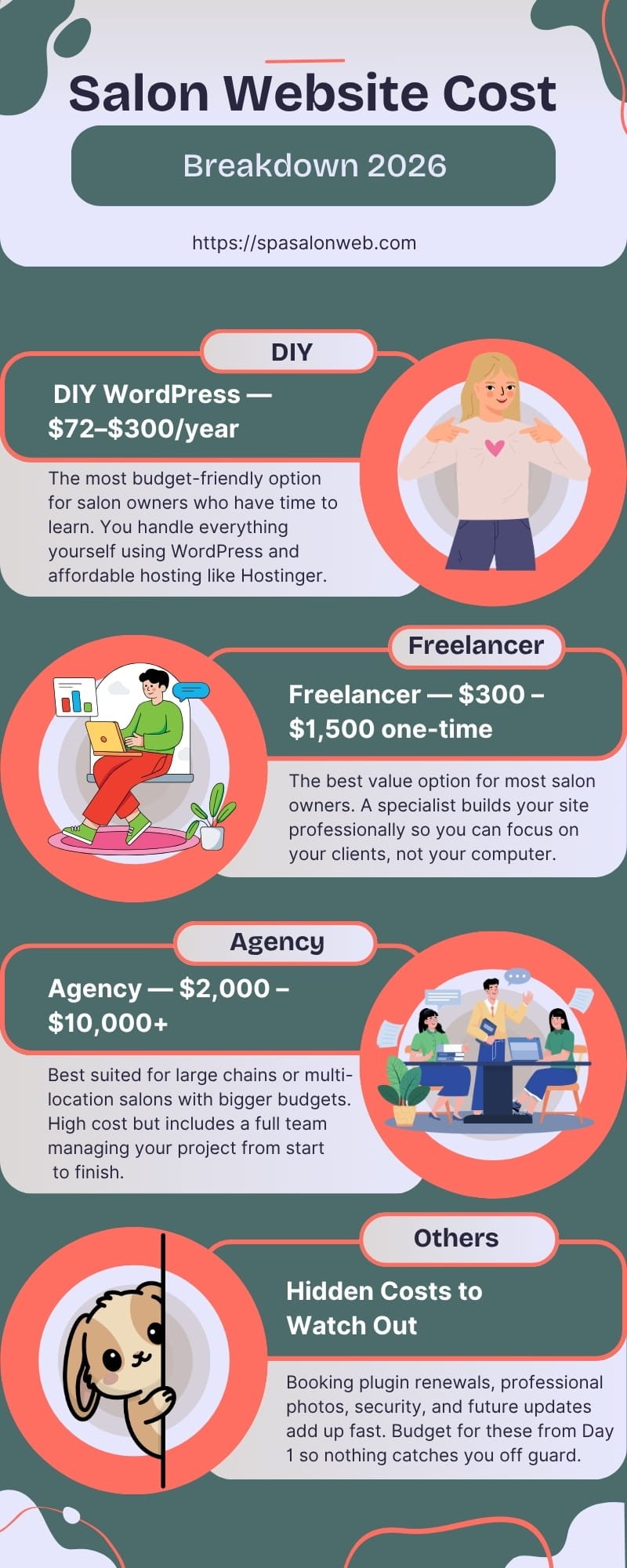
If you’re just starting out and have more time than budget — go DIY with WordPress on Hostinger. It’s the most cost-effective option and Hostinger makes the technical side as simple as possible. Expect to invest 2–4 weeks learning the basics.
If you want it done professionally without the agency price tag — hire a freelancer. You’ll get a faster result, a better design, and you can be back to focusing on your clients within 1–2 weeks. Check my Fiverr packages if you want a specialist who has built 300+ salon sites specifically.
If you’re running a multi-location chain with a serious budget — then yes, consider an agency. But even then, get quotes from multiple agencies and compare.
For most salon and spa owners reading this — a WordPress website on Hostinger, either built by you or by a specialist freelancer, is the smart choice. You get professional quality, full control, and the lowest ongoing costs in the industry.
Ready to Get Started?
You have two paths depending on what you need:
Want to build it yourself? Start with Hostinger — grab the Premium plan, get your free domain, and you’ll be live faster than you think. I also have a complete Salon Website Launch Checklist to guide you through every step.
Want it done for you — properly? Check my Fiverr packages and send me a message. Tell me about your salon, what pages you need, and whether you need a booking system. I’ll get back to you within 24 hours.
Either way — your salon deserves a website that works as hard as you do. The cost is smaller than most owners expect. The return in new bookings makes it worth every dollar.
Have questions about salon website costs? Drop them in the comments below — I read and reply to every one.
Frequently Asked Questions — how much does a salon website cost in 2026?
Q1: How much does a basic salon website cost in 2026?
A: A basic salon website built on WordPress with Hostinger hosting costs as little as $72–$150 for the first year. This includes hosting, a free domain, SSL, and a free theme. If you add a premium booking plugin, budget around $200–$300 total for year one.
Q2: Is it cheaper to build a salon website myself or hire someone?
A: DIY is cheaper upfront — around $72–$300/year. But hiring a freelancer ($300–$1,500 one-time) saves you weeks of learning time and usually results in a more professional, faster-loading site. For most salon owners, the freelancer option delivers better value when you factor in your time.
Q3: Do I really need a booking system on my website?
A: Yes. A booking system is the most important feature of any salon website. It lets clients book appointments 24/7 without calling you. Plugins like Amelia and BookingPress start free and handle everything from appointment scheduling to automatic reminders.
Q4: Why do I need web hosting? Can’t I just use Wix or Squarespace?
A: Wix and Squarespace include hosting in their plans, which is why they seem simpler. But WordPress with Hostinger gives you more control, better performance, lower long-term costs, and no platform lock-in. Once you outgrow Wix, migrating is painful and expensive.
Q5: What is the cheapest hosting for a salon website?
A: Hostinger is currently the best value for salon websites — plans start at $2.99/month and include a free domain, free SSL, and LiteSpeed servers optimized for WordPress. It’s what I personally use and recommend to all my clients.
Q6: How long does it take to build a salon website?
A: DIY typically takes 2–4 weeks if you’re learning as you go. Hiring a freelancer like me usually means your site is live within 5–10 business days, depending on how quickly you provide your content, photos, and feedback.
Q7: Are there hidden costs I should know about before building my salon website?
A: Yes — the ones most people miss are: booking plugin annual renewals ($79–$150/year), professional photography ($200–$500), premium stock photos if needed, and future maintenance costs. I cover all of these in detail above so you’re not caught off guard after launch.
Q8: Can I build my salon website for free?
A: Technically yes — WordPress is free, and free themes and plugins exist. But you’ll still need to pay for hosting (from $2.99/month) and a domain name (around $10–15/year). There’s no truly free professional website — but with Hostinger you can get started for under $100 for the entire first year.