Most salon websites have the same problem: they get visitors, but those visitors leave without booking anything.
You spent money on a website. Maybe you even paid someone to design it. But if your phone isn’t ringing and your online booking calendar is empty, something is broken — and it’s usually not what you think.
In this post, I’ll walk you through exactly how to get more bookings through your salon website in 2026 — based on what I’ve seen across hundreds of real projects, not generic marketing advice.
My name is Nreepen KM Dony. I’m a WordPress developer with over 10 years of experience, and I’ve built more than 300 websites specifically for spa and salon businesses through my Fiverr profile. I’ve seen what works, what fails, and what silently kills bookings without the salon owner ever knowing why.
Let’s start with the real reason most salon websites don’t convert.
Disclosure: This post recommends tools and services based on personal use and experience. If I join an affiliate program for any of these in the future, I’ll clearly mark those links as affiliate links.
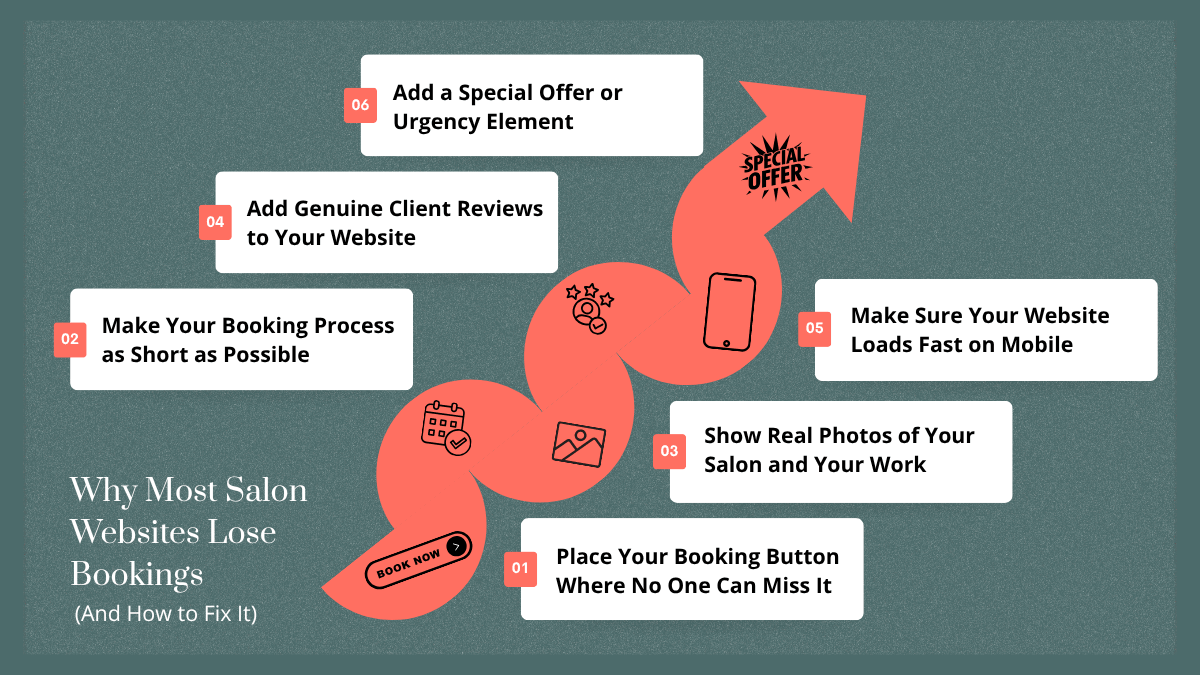
Why Most Salon Websites Lose Bookings (And How to Fix It)
After reviewing hundreds of salon websites, I keep seeing the same conversion killers over and over again.
The booking button is buried. It’s somewhere at the bottom, or hidden in a menu, or just not visible on mobile at all. Visitors won’t hunt for it — they’ll just leave.
The page loads too slowly. If your site takes more than 3 seconds to load on a phone, you’ve already lost the booking. People don’t wait.
There are no trust signals on the page. No real photos, no reviews, no pricing — nothing that tells a first-time visitor they can trust you with their hair, skin, or nails.
The booking form asks too much upfront. Asking for address, date of birth, notes, and five other fields before someone can book their first appointment is a guaranteed way to lose them halfway through.
These aren’t design problems. They’re conversion problems — and every single one is fixable. Here’s how.
Tip 1: Place Your Booking Button Where No One Can Miss It
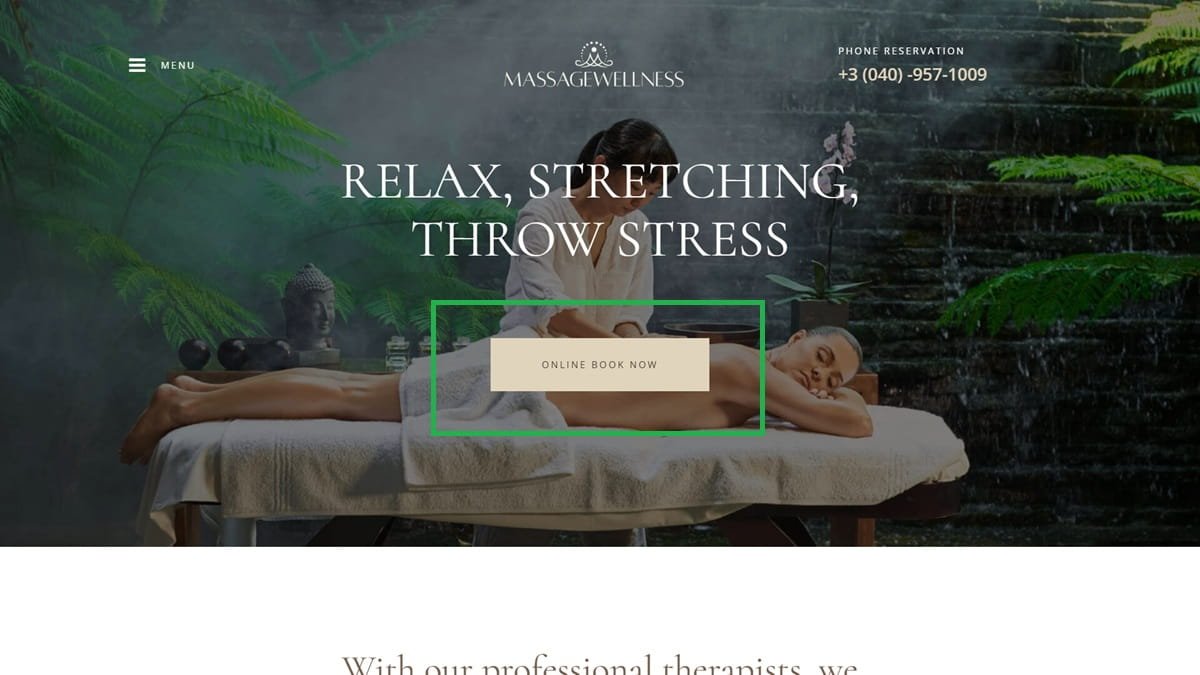
Your booking button is the most important element on your entire website. If someone has to look for it, you’ve already lost.
Place it above the fold on your homepage — meaning visitors should see it without scrolling at all. It should be the first thing their eye lands on after your headline.
On mobile, use a sticky header so the booking button stays visible as visitors scroll down. From my experience building 300+ salon sites, this single change has the highest impact on bookings of anything I’ve implemented. A visitor who is ready to book should never have to scroll back up to find the button.
Also add the booking button at the bottom of every service page. If someone reads your full description of a facial treatment and likes it, the next thing they should see is a clear path to book it.
Action you can take today: Open your website on your phone and check whether your booking button is visible without scrolling. If it’s not, fix that before anything else.
Tip 2: Make Your Booking Process as Short as Possible
Every extra field in your booking form is a reason for someone to abandon it.
I’ve seen salon booking forms with 12 required fields. No one fills those out. Keep it to the absolute minimum: name, service type, preferred date, and phone number. That’s it. You can collect everything else after the booking is confirmed.
For WordPress salon websites, I recommend either Amelia or Bookly as your booking plugin.
Amelia is my top pick — it’s clean, handles appointments and staff scheduling well, and the customer-facing booking flow is simple enough that even non-tech-savvy clients can use it without confusion. Bookly is a solid alternative with more add-ons if you need extra flexibility.
Both are far better than using a generic contact form for bookings, which forces clients to wait for a manual reply before they’re confirmed.
Action you can take today: Count how many fields are in your current booking form. If it’s more than five, remove the ones that aren’t absolutely necessary.
Tip 3: Show Real Photos of Your Salon and Your Work
A visitor deciding whether to book with you is looking for one thing: proof that you’re good at what you do.
Before-and-after photos build instant trust. If you do hair coloring, show the transformation. If you do facials, show the results. Real work photos convert far better than stock images of a spa that could be anywhere in the world.
Real team photos also matter more than most salon owners realize. A genuine photo of your stylists or therapists makes your business feel human and approachable. I’ve had clients switch from stock photos to real team photos and see a noticeable increase in inquiries within weeks.
One technical note: compress your images before uploading them. Large, uncompressed images are one of the most common reasons salon websites load slowly. Use a plugin like Smush or ShortPixel to handle this automatically — I’ll cover those in the tools section below.
Action you can take today: Replace at least one stock photo on your homepage with a real photo of your team or your work.
Tip 4: Add Genuine Client Reviews to Your Website
Reviews are the single most powerful trust signal you can put on a salon website. Nothing convinces a hesitant first-time visitor to book more than seeing that other real people had a great experience.
The easiest approach is to embed your Google reviews directly on your homepage. There are free and paid WordPress plugins that pull your Google Business reviews and display them automatically — this keeps your review section fresh without any manual work.
You can also screenshot positive reviews from Facebook or Instagram and display them as images on your site. This works especially well if you have detailed, specific reviews that mention a particular service or staff member.
Here’s what I always tell my clients: fake or generic reviews hurt more than they help. Visitors can tell when testimonials are made up. If the reviews on your site sound like “Great service, very professional!” with no name or detail, they don’t build trust — they raise doubts.
Action you can take today: Set up your Google Business Profile if you haven’t already, and ask your last 5 satisfied clients to leave you a review there.
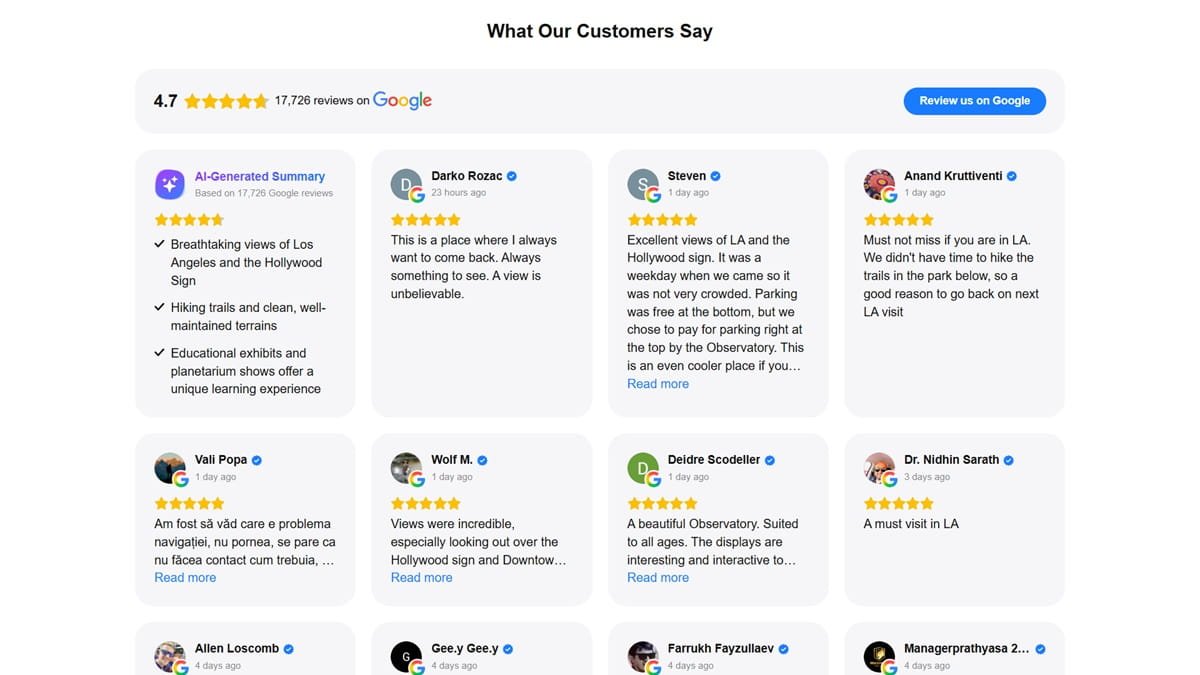
Example of how Google reviews look when embedded on your salon website using a reviews plugin.
Tip 5: Make Sure Your Website Loads Fast on Mobile
Over 70% of salon website visitors come from mobile devices. If your site is slow on a phone, you are losing bookings every single day — and you probably don’t even know it.
A slow website doesn’t just frustrate visitors. It actively destroys your Google ranking, which means fewer people find you in the first place.
From my experience, the three biggest causes of slow salon websites are: bad hosting, heavy themes, and uncompressed images. Fix all three and you’ll see a real difference.
For hosting, I use and recommend Hostinger. It’s fast, affordable, and reliable — and it’s what SpaSalonWeb.com itself runs on. You can compare it against other hosting options in my Best Web Hosting for Salon Websites in 2026 (Honest Comparison) hosting comparison post to see exactly how it stacks up on speed and price.
For image compression, install Smush (free) or ShortPixel (paid but worth it for larger sites). These plugins compress your images automatically so you don’t have to think about it.
For your theme, use a lightweight option like Astra or GeneratePress rather than a bloated page builder theme that loads dozens of scripts.
Action you can take today: Test your website at Google PageSpeed Insights (pagespeed.web.dev) and check your mobile score. If it’s below 70, hosting and image compression are where to start.
Tip 6: Add a Special Offer or Urgency Element
Sometimes a visitor is genuinely interested in booking but just needs a small push to act now instead of “later” — which usually means never.
A limited-time offer does exactly that. Something simple like “Book this week and get 10% off your first visit” gives a hesitant visitor a concrete reason to book today rather than think about it.
Keep the offer visible in your homepage hero section — the first thing visitors see. Don’t bury it in the footer or on a separate promotions page. It needs to be front and center to create the right urgency.
You don’t need to run permanent discounts. Even a short offer during a slow week or month can meaningfully increase bookings. Rotate offers seasonally — first-visit discounts, seasonal treatment bundles, or referral bonuses all work well.
Action you can take today: Add a single sentence to your homepage hero section with a time-sensitive offer and a direct booking link – These are powerful tips & tricks of “How to Get More Bookings Through Your Salon Website”.
Tools I Recommend to Increase Salon Bookings
Here are the tools I recommend to my clients for turning their salon website into a consistent booking source:
Tool | What It Does | Free or Paid |
|---|---|---|
Amelia | Online appointment booking plugin for WordPress — clean, easy for clients to use | Paid (free lite version available) |
Bookly | Alternative booking plugin with more add-ons and flexibility | |
Smush | Automatically compresses images on your WordPress site to improve speed | |
ShortPixel | Image compression plugin — more powerful than Smush for high-volume sites | |
Hostinger | Fast and affordable WordPress hosting — what I use for my own sites | |
Google Business Profile | Free tool to collect and display verified reviews from real clients | |
MonsterInsights / Google Analytics | Tracks where your website visitors come from and which pages lead to bookings | |
If I had to pick the single most important tool for conversions, it’s your booking plugin. Without a proper online booking system, every other improvement you make just sends visitors to a dead end. Get Amelia or Bookly set up before anything else.
For hosting, I’ve tested several options over the years and Hostinger consistently delivers the best performance for the price — especially for WordPress sites in the small business range. SpaSalonWeb.com runs on Hostinger, and the speed shows.
Booking Mistakes I See on Salon Websites (From 300+ Projects)
No mobile-optimized booking button. This is the most common and most damaging mistake I see. The booking button is either too small to tap on a phone, hidden in a dropdown menu, or completely absent from the mobile version of the site. Since most visitors come from mobile, this mistake alone can eliminate the majority of your potential bookings.
Booking forms with too many required fields. I’ve reviewed salon booking forms that ask for the client’s full address, preferred stylist, allergies, and multiple other details before confirming a single appointment. People abandon these forms. A first booking needs five fields at most — the rest can come later.
No confirmation email or SMS after booking. If a client books online and receives nothing in return, they’ll wonder whether the booking actually went through. They’ll either call to confirm (wasting your time) or assume something went wrong and book elsewhere. A simple automated confirmation message is essential — Amelia and Bookly both handle this.
Outdated availability. Showing time slots that are already booked, or not syncing your online booking calendar with your actual schedule, erodes trust fast. If a client books a slot and then receives a call saying it’s not available, they may not come back. Keep your calendar accurate or use a plugin that syncs automatically.
3 Quick Wins You Can Do Today
1. Add your phone number to your homepage header. Many salon websites hide the phone number in the footer or contact page. Put it in your header where it’s visible on every page. Some clients simply prefer to call — make it easy for them.
2. Enable click-to-call on mobile. Make sure your phone number is a clickable link on mobile so visitors can call you with one tap. In WordPress, this is as simple as formatting your number as tel:+1XXXXXXXXXX in your link. No developer needed.
3. Add a Google Maps embed to your contact page. Many first-time clients want to see exactly where you are before booking. A Google Maps embed on your contact page removes that uncertainty and makes your location feel real and findable. Just copy the embed code from Google Maps and paste it into your page — takes under 5 minutes.
Ready to Turn Your Website Into a Booking Machine?
Your salon website should be working for you around the clock — bringing in bookings even while you’re with clients or closed for the evening. Most salon websites don’t do that, not because it’s complicated to fix, but because the right adjustments haven’t been made.
Start with the highest-impact changes: your booking button placement, your booking form length, and your page speed on mobile. Get those right and you’ll see a difference.
If you want me to review your salon website and tell you exactly what is holding back your bookings, feel free to reach out — or hire me on Fiverr for a full website audit and optimization.
Frequently Asked Questions — How to Get More Bookings Through Your Salon Website
Q1: How many bookings should my salon website get per month?
A: This depends on your traffic, location, and how competitive your market is. As a general benchmark, a well-optimized salon website should convert 2–5% of visitors into bookings. If you’re getting 500 visitors a month, that’s 10–25 bookings. If you’re converting less than 1%, your site has a conversion problem worth fixing.
Q2: Which booking plugin is best for a WordPress salon site?
A: I recommend Amelia for most salon and spa websites. It handles appointment types, staff scheduling, and client notifications cleanly, and the booking flow is simple enough for any client to complete on their phone. Bookly is a strong alternative if you need more customization options. Both are significantly better than using a basic contact form for appointments.
Q3: Does website speed really affect bookings?
A: Yes — more than most salon owners realize. Google research shows that for every additional second a mobile page takes to load, conversions drop by roughly 20%. If your site takes 5–6 seconds to load on a phone, you’re likely losing more than half of your potential bookings before anyone even sees your services. Speed is not a technical nicety — it directly affects revenue.
Q4: Do I need a developer to make these changes?
A: Not for most of them. The quick wins in this post — adding a booking button to your header, reducing form fields, enabling click-to-call, adding your phone number — can all be done inside WordPress without touching any code. For more technical improvements like speed optimization, theme changes, or custom booking setups, hiring a developer for a few hours is worth the investment. You can find me on Fiverr if you need help.