
You just finished building your WordPress salon website — or maybe someone built it for you — and now you are staring at a list of hosting providers, all of them claiming to be the fastest, the cheapest, and the most reliable. Every company promises the same things. It is impossible to know who to trust.
I am Nreepen KM Dony, a WordPress developer with 10+ years of experience and over 300 spa and salon websites built on Fiverr. I know exactly how confusing this decision feels — because I watch my clients go through it after every project delivery.
This post is my honest comparison of the best hosting for salon websites, based on real experience — not sponsored rankings. I have worked with almost every major hosting provider while building 300+ spa and salon websites. I know which ones make clients happy and which ones cause problems — and I am going to be completely honest about both.
By the end, you will know exactly which hosting to pick for your specific situation.
Disclosure: This post recommends tools and services based on personal use and experience. If I join an affiliate program for any of these in the future, I’ll clearly mark those links as affiliate links.
What I Look for in Hosting After 300+ Salon Website Projects
Before I get into specific recommendations, here is the criteria I personally use when evaluating hosting for a salon or spa website. These are not generic feature checkboxes — they come from watching what actually matters once a real salon goes live.
Server speed and performance. A salon booking page must load in under 3 seconds on mobile — anything slower and you lose the booking before the client even sees your services. I specifically look for hosts running LiteSpeed servers with built-in caching, not just any shared hosting that technically works with WordPress. Speed is not optional for a business that books appointments online. Read my full Salon Website Speed Tips.
Ease of use for non-technical owners. After I deliver a project, my client manages the hosting themselves. The control panel needs to be simple enough for a salon owner with zero technical background to handle basic tasks — like renewing SSL, checking email, or managing files — without calling a developer every time something changes.
Reliability and uptime. A salon website that goes down loses real bookings in real time. If someone clicks your booking link at 9pm on a Tuesday and your site is down, they are booking with your competitor in 30 seconds. I look for a minimum 99.9% uptime guarantee, but more importantly I look for hosts with a real track record — not just a number printed on a marketing page.
Value for money. Most salon owners are small business owners on a tight budget. Hosting should be affordable without stripping out the features that actually matter. Watch out closely for cheap intro prices that double or triple at renewal — this is one of the most common traps I see new clients fall into.
WordPress compatibility. Every salon website I build runs on WordPress. The host must be fully optimized for WordPress, not just technically compatible with it. I treat the official WordPress.org hosting recommendation as the gold standard — it is not a marketing badge, it means the platform has been reviewed and approved by the WordPress core team.
My Top Hosting Recommendations for Salon Websites
Here are the four hosts I have seen most often across my 300+ projects, reviewed honestly.
Hostinger — Best Overall for Salon Websites
⭐⭐⭐⭐⭐ 4.8/5
Hostinger is my number one recommendation for spa and salon websites, and it has been for the past several years. It combines fast LiteSpeed servers, a genuinely beginner-friendly control panel, and WordPress.org-recommended status at a price point that works for small salon budgets.
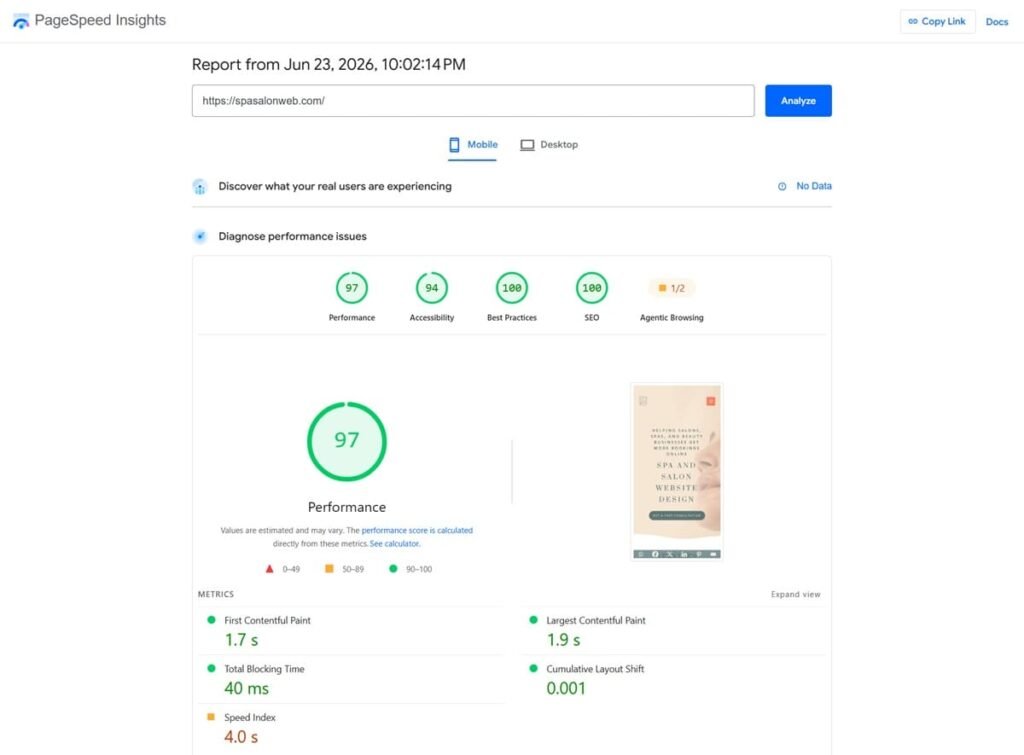
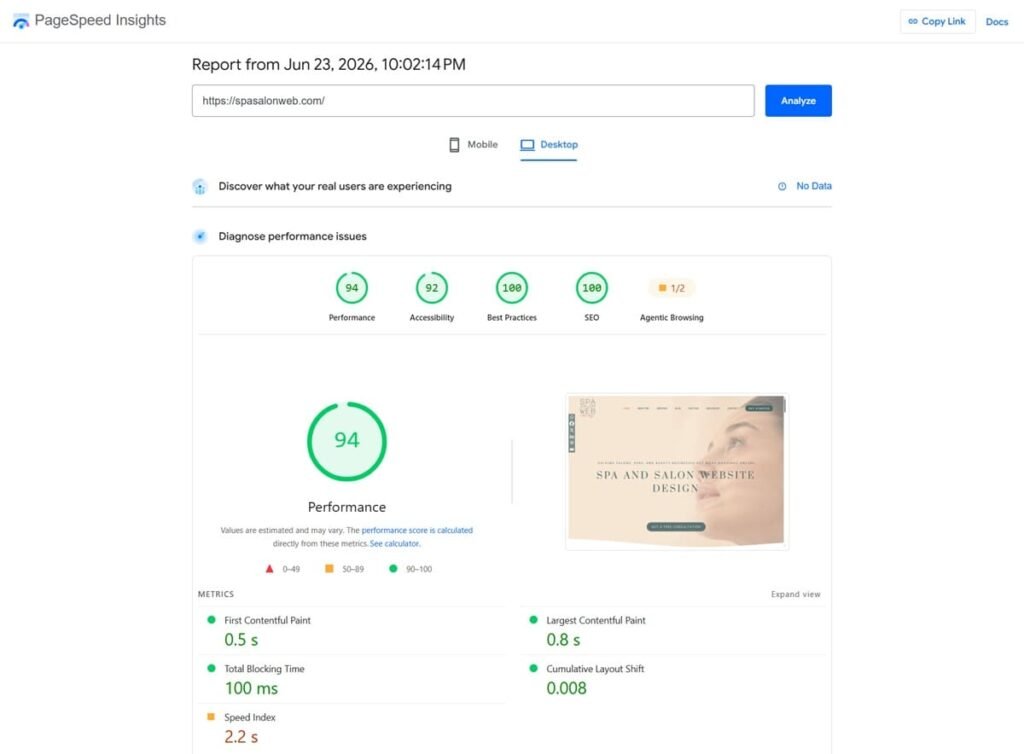
Performance: Hostinger runs on LiteSpeed servers with built-in caching, which makes a measurable difference for booking-heavy salon sites. SpaSalonWeb.com — my own website — runs on Hostinger and consistently scores 90+ on Google PageSpeed. That is not luck, it is the infrastructure.
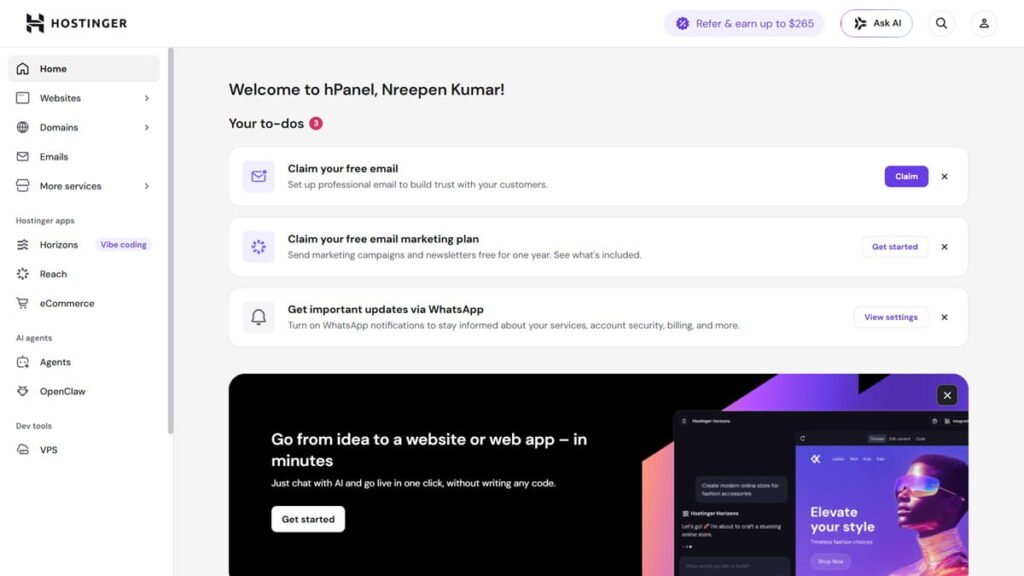
Ease of use: Hostinger uses hPanel, their custom control panel. It is clean, well-organized, and straightforward enough that my clients can handle basic hosting tasks without my help. That matters a lot when I am not available and a client needs to do something simple.
Pricing: Starting at $2.99/month on the intro plan, renewing at approximately $10.99/month. The renewal increase is real — I will not pretend otherwise — but compared to the competition, it is one of the more reasonable long-term rates in the market.
Verdict for salon websites: This is the host I refer every Fiverr client to after project delivery. The combination of speed, ease of use, WordPress.org recommendation, free SSL, and free domain makes it the most complete package for salon business owners.
Pros:
- LiteSpeed servers with built-in caching
- Easy hPanel — salon owners can manage it without help
- WordPress.org recommended
- Free SSL and free domain included
- Best long-term value among comparable hosts
- Excellent for beginners
Cons:
- Renewal price is higher than the intro price
- No monthly billing on the cheapest plans
Bluehost — Good for Beginners
⭐⭐⭐⭐ 4.2/5
Bluehost is one of the most recognized names in WordPress hosting, and for good reason — it is WordPress.org recommended, beginner-friendly, and has solid US-based support. It is a legitimate option, especially for salon owners in the United States who prefer a domestic provider.
Performance: Speed is decent on Bluehost, but it does not match Hostinger on LiteSpeed performance. For most salon websites with moderate traffic, it is fine — but if your booking page has high load or you expect fast growth, you will feel the difference.
Ease of use: Bluehost uses a simplified cPanel setup that is well-documented and easy to navigate. Support is responsive and available 24/7, which is reassuring for non-technical owners.
Pricing: Starting at $2.99/month, renewing at approximately $9.99/month. The renewal jump is steep, and it is worth factoring into your decision upfront.
Verdict for salon websites: A solid alternative, particularly for US-based salon owners. Not my first recommendation, but a trustworthy choice if you prefer a familiar brand with good support availability.
Pros:
- WordPress.org recommended
- Easy setup, well-documented
- Good customer support
- Free domain for the first year
Cons:
- Higher renewal rates
- Slower than Hostinger on LiteSpeed performance
- Owned by Newfold Digital, which has mixed reviews in the hosting community
SiteGround — Best Performance, Higher Price
⭐⭐⭐⭐ 4.0/5
SiteGround is genuinely excellent. It runs on Google Cloud infrastructure, delivers outstanding speed and uptime, and their support team is one of the best in the industry. If performance is your top priority and budget is not a concern, SiteGround is worth considering.
Performance: This is where SiteGround stands out. The Google Cloud infrastructure and their in-house caching solution deliver strong results for WordPress sites. Uptime is consistently reliable.
Ease of use: SiteGround has moved to a custom control panel that is clean and modern. It is not quite as intuitive as hPanel for absolute beginners, but most users adapt quickly.
Pricing: Intro price starts at $2.99/month — but the renewal is approximately $14.99/month, one of the steepest jumps in the industry. That long-term cost is the honest reason I rarely recommend SiteGround to salon owners who are watching their budget.
Verdict for salon websites: Excellent hosting, but the renewal pricing makes it hard to recommend for most small salon businesses. If you are building a high-traffic multi-location salon brand and budget is secondary, SiteGround earns it. For most independent salon owners, the price-to-value ratio does not beat Hostinger.
Pros:
- Excellent speed on Google Cloud infrastructure
- Outstanding customer support
- Strong security features
Cons:
- Very steep renewal pricing
- No free domain included
- Expensive for long-term use on a small salon budget
GoDaddy — Convenient but Not Recommended
⭐⭐⭐ 3.2/5
GoDaddy is one of the most recognized names on the internet — and genuinely one of the best domain registrars out there. But for WordPress hosting specifically, it is not where I would put a salon website.
Performance: Adequate but not optimized. GoDaddy’s shared hosting is not built specifically around WordPress performance, and it shows in speed tests compared to LiteSpeed alternatives.
Ease of use: The GoDaddy control panel is functional, but the checkout and upsell process is notoriously aggressive — it is easy for a non-technical salon owner to accidentally add services they do not need.
Pricing: Starting at $5.99/month — already more expensive than the competition from day one. SSL is not included on lower-tier plans, which means additional cost for something that should be standard in 2026.
Verdict for salon websites: Use GoDaddy to register your domain if you want — they are good at that. But use a better host for the actual website.
Pros:
- Well-known and trusted brand for domains
- Easy domain management
- Phone support available
Cons:
- Not WordPress.org recommended
- SSL costs extra on basic plans
- More expensive than competitors for comparable features
- Aggressive upselling during checkout
Hosting Comparison at a Glance
Choosing between four providers can get confusing fast, so here is a side-by-side breakdown of the key facts. I have kept it simple — these are the numbers and features that actually matter for a salon website owner making a decision today.
Host | Starting price | Renewal rate | Free SSL | Free domain | WP recommended | Best for |
|---|---|---|---|---|---|---|
Hostinger | $2.99/mo | ~$10.99/mo | ✓ Free | ✓ 1 year free | ✓ Yes | Budget-friendly, |
Bluehost | $2.99/mo | | ✓ Free | ✓ 1 year free | ✓ Yes | WordPress beginners, |
SiteGround | $2.99/mo | ~$14.99/mo | ✓ Free | ✗ Not included | ✓ Yes | Performance-focused sites, |
GoDaddy | $5.99/mo | ~$7.99/mo | ~ Only on | ✓ 1 year free | ✗ No | Domain registration, |
For most spa and salon website owners, Hostinger offers the best combination of speed, ease of use, and long-term value.
My Honest Pick After 300+ Salon Projects: Hostinger
I use Hostinger for SpaSalonWeb.com — my own business website. I refer it to every client I deliver a project to on Fiverr. That is not an affiliate move — it is what I genuinely believe is the right call.
The LiteSpeed servers make a real difference for booking pages. When a potential client clicks your “Book Now” button on mobile, that page needs to load instantly. Hostinger delivers that consistently. The hPanel is clean enough that my clients can manage basic hosting tasks without needing to call me, which saves them money and saves me interruptions.
The pricing is fair. The intro rate is competitive, and the renewal rate — while higher — is one of the more reasonable ones compared to Bluehost and SiteGround at renewal. Free SSL and a free domain on most plans mean you are not paying separately for things that should come standard.
If Hostinger ever stopped being the best option for my clients I would update this post — but right now in 2026 it remains my top pick for spa and salon websites without question.
Which Hosting Is Right for Your Salon?
Not every salon situation is the same. Here is a quick decision guide.
Choose Hostinger if:
- You want the best combination of speed and long-term value
- You are launching a new salon website in 2026
- Your client — or you — will manage the hosting without developer help
- You want WordPress.org recommended hosting at an affordable price
Choose Bluehost if:
- You are based in the USA and want local support options
- You are comfortable with slightly higher renewal costs for a familiar brand
Choose SiteGround if:
- Budget is not a concern and you want premium performance and support
- You are expecting high traffic from day one — a large chain or multi-location brand
Choose GoDaddy if:
- You only need domain registration — use one of the above for the actual hosting
Ready to Choose the Right Hosting for Your Salon Website?
Hosting is one of the most important infrastructure decisions you make for your salon website. Get it wrong — slow load speeds, frequent downtime, or a confusing control panel — and everything else suffers. Your marketing spend, your SEO, your bookings. All of it depends on a solid foundation.
Start with the right host from day one and you will not need to migrate later, which saves time, money, and headaches. Read my full Salon website launch checklist.
If you have questions about which hosting plan is right for your specific situation, feel free to reach out on Fiverr — I am happy to advise.
Frequently Asked Questions — Best hosting for salon website
Q1: How much should I pay for salon website hosting?
A: For a small salon or spa website, a good budget is $3–$5 per month on an introductory plan. The key is to check the renewal price before you commit — many hosts advertise low intro rates that increase significantly at renewal. Hostinger’s renewal rate is around $10.99/month, which is reasonable for what you get.
Q2: Is Hostinger really good for WordPress?
A: Yes — Hostinger is officially recommended by WordPress.org, which is not a badge every host earns. Their LiteSpeed servers and built-in WordPress optimization tools make it one of the strongest performers in the shared hosting category. SpaSalonWeb.com scores 90+ on Google PageSpeed running on Hostinger.
Q3: What happens if my hosting is too slow?
A: Slow hosting directly costs you bookings. If your booking page takes more than 3 seconds to load on mobile, a significant percentage of visitors leave before it finishes loading. Google also factors page speed into search rankings, so slow hosting can hurt your visibility in local search results — exactly where salon owners need to be found.
Q4: Can I switch hosting later if I am not happy?
A: Yes, you can migrate your WordPress website to a different host at any time. Most reputable hosts offer free migration assistance. That said, migrating a live website has risks if not done carefully — broken links, email downtime, and DNS propagation delays are common issues. It is always easier to start on the right host than to move later.
Q5: Do I need separate hosting and domain, or can I get both together?
A: You can get both from the same provider — and for most salon owners, that is the simplest approach. Hostinger includes a free domain with most plans, so you can set everything up in one place. If you already registered a domain elsewhere (like GoDaddy), you can still point it to any host you choose. It takes about 24–48 hours for the domain to fully propagate.